Tag: LLMs

  • KV Caching in LLMs Explained: Faster Inference, Lower Cost, and How It Actually Works

    KV Caching in LLMs Explained: Faster Inference, Lower Cost, and How It Actually Works

    KV caching in LLMs is one of the most important (and most misunderstood) reasons chatbots can stream tokens quickly. If you’ve ever wondered why the first response takes longer than the next tokens, or why long chats get slower and more expensive over time, KV cache is a big part of the answer.

    In this guide, I’ll explain KV caching from first principles, connect it to real serving behavior (prefill vs decode, batching, tail latency), show the memory math so you can estimate cost, and then give practical tactics to reduce latency and GPU spend in production.

    KV caching in LLMs

    TL;DR

    • KV cache stores attention keys and values for previously processed tokens so you don’t recompute them on every generation step.
    • It dramatically speeds up decode (token-by-token generation). It does not remove the cost of prefill (prompt processing).
    • The tradeoff: KV cache uses a lot of GPU memory and grows linearly with context length (prompt + generated tokens).
    • At scale, long-context workloads are often memory-bandwidth bound, not compute-bound.
    • Serving stacks use continuous batching, prefix caching, and paged KV cache to keep throughput high without memory fragmentation.

    Table of contents

    What is KV cache in LLMs?

    Most modern LLMs are Transformer decoder models. They generate text autoregressively: one token at a time. At generation step t, the model needs to condition on all tokens 1..t-1 that came before. That conditioning happens through self-attention.

    In self-attention, each layer projects the hidden states into queries (Q), keys (K), and values (V). The current token’s query compares against the past keys to compute attention weights, and those weights are used to combine the past values. That gives the current token a context-aware representation, which eventually produces the next-token logits.

    KV caching is the idea of storing the keys and values for past tokens so you can reuse them in later steps, instead of recomputing them from scratch at every generation step.

    This is why it’s called “KV” cache (not “QKV” cache): queries depend on the current token, so they must be recomputed every step; keys and values for prior tokens can be reused.

    Quick refresher: Q, K, V in attention (no fluff)

    If you haven’t looked at attention math in a while, here’s the short version. Given hidden states X, attention computes:

    Q = X Wq
    K = X Wk
    V = X Wv
    Attention(X) = softmax(Q K^T / sqrt(d)) V

    During decoding, you only need the new token’s query (Q_new), but you need the keys/values for all previous tokens. Without caching, you would repeatedly compute K and V for the whole history, which is pure redundancy.

    Prefill vs decode: where KV cache helps

    In serving, you’ll often hear two phases:

    • Prefill (prompt processing): run the model over the entire prompt once. This creates the initial KV cache for all prompt tokens.
    • Decode (generation): generate output tokens one-by-one, reusing KV cache and appending new K/V each step.

    KV caching helps decode massively, because decode would otherwise redo the same work at every token step. But prefill is still expensive: you must process every prompt token at least once. That’s why “long prompt” apps often feel slow even on strong GPUs.

    In real systems, prefill latency often correlates strongly with prompt length, while decode latency correlates strongly with (a) output tokens and (b) memory bandwidth pressure from reading the growing KV cache.

    How KV caching works (step-by-step)

    Let’s walk through a single request. Assume the user prompt has N tokens and you will generate M tokens.

    Step 1: Prefill builds the initial cache

    The model processes all N prompt tokens. For each layer ℓ, it computes K_ℓ and V_ℓ for tokens 1..N and stores them in GPU memory. After prefill, you have a KV cache that represents the entire prompt, at every layer.

    Step 2: Decode uses the cache and appends to it

    To generate token N+1:

    • Compute hidden state for the new token.
    • Compute Q_new, K_new, V_new for the new token at each layer.
    • Compute attention using Q_new over all cached K (prompt tokens) and produce a weighted sum over cached V.
    • Append K_new and V_new to the cache.

    Then repeat for token N+2, N+3, … until you generate M tokens (or hit a stop condition). The cache grows from N tokens to N+M tokens.

    Why KV caching is faster (intuition + complexity)

    KV caching saves you from recomputing K/V projections for old tokens at each decode step. That doesn’t just reduce FLOPs—it also improves practical throughput because projection layers (and the memory traffic associated with them) would be repeated unnecessarily.

    However, KV caching does not make attention free. At step t, the model must still read the cached K/V for tokens 1..t-1. So decode time grows with context length: longer context = more KV reads per token. That’s the core reason long chats slow down.

    This is why you’ll sometimes hear: “prefill is compute-heavy; decode becomes memory-bound.” It’s not universally true, but it’s a good rule of thumb for long-context workloads.

    KV cache memory math (with a worked example)

    If you’re trying to understand cost, you need a back-of-the-envelope estimate. A simplified KV cache size per token is:

    KV bytes per token ≈ 2 * layers * kv_heads * head_dim * bytes_per_element

    Total KV bytes for a sequence of T tokens is that number multiplied by T (and then multiplied by batch size if you have multiple concurrent sequences).

    Worked example (order-of-magnitude, not exact): Suppose a model has:

    • 32 layers
    • 8 KV heads (e.g., with GQA)
    • head_dim = 128
    • dtype = FP16 or BF16 (2 bytes per element)

    Then KV bytes per token ≈ 2 * 32 * 8 * 128 * 2 = 131,072 bytes ≈ 128 KB per token.

    If your context length is 4,096 tokens, that’s ~512 MB of KV cache for one sequence. If you serve 10 such sequences concurrently on the same GPU, you’re already at ~5 GB of KV cache just for attention memory, before model weights, activations, fragmentation overhead, and runtime buffers.

    Again, this is simplified (actual implementations pack tensors, use different layouts, sometimes store additional buffers). But the point stands: long context is expensive primarily because KV cache is expensive.

    Why GQA/MQA reduces KV cache size

    Classic multi-head attention has many heads and each head has its own K/V. Newer architectures often use GQA (grouped-query attention) or MQA (multi-query attention), where you have many query heads but fewer KV heads shared across them.

    KV cache size scales with the number of KV heads, not the number of query heads. So moving from (say) 32 KV heads to 8 KV heads can reduce KV cache memory by 4× for the same sequence length. That’s a massive win for long-context serving.

    KV cache in production serving: batching, throughput, tail latency

    In production, you rarely serve a single request at a time. You’re doing scheduling across many users, each with different prompt lengths, output lengths, and response-time expectations.

    Continuous batching: why it exists

    Traditional batching assumes all sequences are the same length (or padded to the same length). But generation is dynamic: some users stop early, others generate long outputs, and new requests arrive continuously. Continuous batching lets the server merge compatible decode steps across requests, improving GPU utilization and throughput.

    The challenge: KV cache allocation for many sequences is messy. That’s where paged KV cache becomes critical, because it avoids allocating huge contiguous buffers per request and reduces fragmentation.

    Why tail latency spikes

    When the server approaches KV memory limits, it must reduce batch size, evict caches, or reject/queue requests. This is often visible as tail latency spikes: p95/p99 get worse before average latency looks terrible. Long-context users can also create “noisy neighbor” effects where they consume disproportionate KV capacity.

    That’s why many production stacks implement context-length tiering, separate pools for long/short requests, and per-tenant limits.

    Modern KV cache techniques (prefix, paged, sliding window, quantized)

    1) Prefix caching (a.k.a. prompt caching)

    If many requests share the same prefix (system prompt, policy text, tool schemas, few-shot examples), you can cache the KV for that prefix and reuse it. This turns repeated prefill into a one-time cost, and it can significantly reduce latency and GPU time for agent-style applications.

    The biggest gotcha is that small differences in the prefix (dynamic timestamps, per-user IDs, slightly different tool schemas) can break reuse. The practical solution is to version your system prompt and keep it stable for long periods.

    2) Paged KV cache (block-based allocation)

    Paged KV cache allocates KV memory in fixed-size blocks/pages. When a sequence grows, you allocate more blocks. When a sequence ends, you return blocks to a free list. This is a big deal for high-throughput serving because it reduces fragmentation and makes continuous batching stable under mixed workloads.

    3) Sliding window attention / context truncation

    Some models support sliding window attention where the model attends only to the last N tokens. Serving systems can also implement truncation policies (keep the last N tokens of chat history). This caps KV cache growth. The tradeoff is losing direct attention to earlier context, so you may need summarization or retrieval to preserve important information.

    4) Quantized KV cache

    KV cache can be quantized to reduce memory and bandwidth. This is especially attractive for long-context workloads where KV dominates runtime. The tradeoff is potential quality loss (especially for tasks sensitive to long-range dependencies). Many stacks treat KV quantization as an opt-in knob you enable when you hit memory ceilings.

    Common anti-patterns that explode KV cost

    If your LLM bill feels unreasonable, one of these is usually happening:

    • Stuffing the entire chat transcript every turn (unbounded history) instead of summarizing or retrieving.
    • Huge system prompts that change slightly every request (breaking prefix caching).
    • Overusing few-shot examples in production paths where they don’t materially change quality.
    • Returning extremely long outputs by default (high max_tokens with no guardrails).
    • One-size-fits-all context limits (everyone gets the maximum context) instead of tiering.

    The blunt truth: the cheapest optimization is usually to reduce tokens, not to optimize kernels. Kernel optimizations matter, but product-level token discipline often dominates.

    How to monitor KV pressure in production

    To manage KV caching, you need the right metrics. At minimum, you want to track:

    • Prompt tokens (prefill tokens) per request
    • Generated tokens (decode tokens) per request
    • Prefill latency vs decode latency (time-to-first-token vs tokens/sec)
    • Active sequences and average context length on each GPU
    • KV cache utilization (if your serving stack exposes it)
    • p95/p99 latency to catch memory pressure early

    If you already instrument your agent pipeline, make sure you attribute tokens to their sources: system prompt, chat history, retrieval chunks, tool outputs. Otherwise, you can’t fix the real cause.

    Practical checklist to cut latency and cost

    Here’s a high-ROI checklist that works for most LLM products:

    • Make time-to-first-token (TTFT) a first-class SLO. TTFT is dominated by prefill. If TTFT is high, your prompt is probably too big.
    • Summarize aggressively. Replace older chat turns with a rolling summary + a small window of recent turns.
    • Use retrieval, not transcript stuffing. Bring only relevant documents into context.
    • Stabilize your system prompt. Version it. Don’t inject dynamic data into it if you want prefix caching benefits.
    • Cap outputs with intent-based limits. Don’t let every request generate thousands of tokens unless it’s a “long-form” mode.
    • Tier context length. Default to smaller contexts; allow larger contexts for premium workflows.
    • Pick architectures that are KV-efficient. Prefer models with GQA/MQA when long context is a core feature.
    • Separate long-context traffic. If you can, route long-context requests to dedicated GPUs/pools so they don’t degrade the experience for short requests.

    FAQ

    Does KV cache help training?

    KV caching is primarily an inference optimization. Training typically processes many tokens in parallel and uses different memory strategies (activations, gradients), so KV cache is mainly discussed for serving and generation.

    Why does the first token take longer?

    Because the model must run prefill over the full prompt to build the initial KV cache. That initial pass dominates “time-to-first-token”. After that, decode can reuse KV cache and generate tokens faster.

    Why do long chats get slower over time?

    Because the KV cache grows with every token. Each decode step must read more cached keys/values, increasing memory traffic. At scale, this reduces throughput and increases tail latency.

    Is KV cache the same as “prompt caching”?

    Prompt/prefix caching is a strategy built on top of KV cache: you persist the KV cache for a common prefix and reuse it across requests. KV cache itself exists within a single request as generation proceeds.

    Tools & platforms (official + GitHub links)

    If you’re implementing or relying on KV caching in real serving systems, these projects are worth knowing:

    • vLLM (popular high-throughput serving; paged attention/KV ideas): GitHub
    • Hugging Face TGI (Text Generation Inference): GitHub
    • NVIDIA TensorRT-LLM (optimized inference stack): GitHub
    • SGLang (serving/runtime for LLM apps): GitHub

    Extra depth: what “memory-bound” really means for KV cache

    People often say “decode is memory-bound.” Concretely, that means the GPU spends more time waiting on memory reads/writes than performing arithmetic. With KV caching, each generated token requires reading a growing amount of cached K/V. As the sequence length increases, the ratio of memory traffic to compute increases. Eventually, the bottleneck is not how fast your GPU can multiply matrices—it’s how fast it can move KV data.

    This is also why improvements like FlashAttention (and related attention kernels) matter: they reduce memory traffic by fusing operations and avoiding writing large intermediate matrices. Even with a KV cache, attention still involves substantial memory movement; kernel-level optimizations can help, but they can’t change the fundamental scaling: longer context means more KV reads.

    Designing product features around KV cache economics

    KV cache is one of those infrastructure details that should influence product decisions. A few examples of “infra-aware product design”:

    • “Long-form mode”: only allow very high max_tokens when the user explicitly opts in, so your default mode stays efficient.
    • “Memory” as structured state: store stable user preferences or facts in a database and inject only the relevant pieces, rather than replaying the full conversation forever.
    • Conversation summarization cadence: summarize every K turns and replace older turns with the summary, keeping the active context bounded.
    • Context tiering by plan: if you’re commercial, selling bigger context windows is effectively selling more GPU memory time—price it accordingly.

    These decisions reduce average context length, which reduces KV cache footprint, which increases throughput, which lowers cost. It’s a straight line from product UX to GPU economics.

    Final takeaway

    KV caching in LLMs is simple in concept—store K and V once, reuse them—but its implications ripple through everything: latency profiles, throughput, memory fragmentation, and even business pricing. If you’re serious about serving LLMs at scale, understanding KV cache is non-negotiable.

    Debugging real-world performance: a simple prefill/decode checklist

    When users complain “the model is slow,” it’s helpful to separate the complaint into two measurable symptoms:

    • Slow time-to-first-token (TTFT) → usually a prefill problem (too many prompt tokens, cold start, too much retrieval, too big system prompt).
    • Slow tokens-per-second (TPS) during streaming → often a decode problem (KV cache is large, server is overloaded, memory bandwidth limits, batch scheduling).

    Once you measure TTFT and TPS separately, you can make the correct fix instead of guessing. For example, reducing prompt size will improve TTFT a lot, but it might not change TPS much if the decode bottleneck is memory bandwidth. Conversely, paged KV cache and better batching can improve TPS under load but won’t make a huge difference if your prompt is 12k tokens long for every request.

    Another worked example: why “just increase context” has a hidden cost

    Imagine your product currently uses a 4k context and feels fine. A stakeholder asks: “Can we ship 16k context? Competitors have it.” From a user perspective, more context sounds like a pure win. From a KV cache perspective, it’s a 4× increase in the worst-case KV footprint per sequence.

    Even if most users don’t hit 16k, the long-tail users who do will:

    • increase TTFT (more prefill tokens)
    • reduce throughput for everyone sharing the GPU (more KV reads per decode step)
    • increase OOM risk and fragmentation pressure (bigger KV allocations)

    A pragmatic approach is to ship long context as a bounded, managed feature: enable it only on certain workflows, isolate it to specific GPU pools, and combine it with summarization/retrieval so you aren’t paying full KV cost every turn.

    KV cache and multi-turn chat: what to do instead of infinite history

    For chat products, the naive implementation is: every time the user sends a message, you send the entire conversation transcript back to the model. That works… until it doesn’t. KV cache grows, latency drifts upward, and your cost per conversation rises over time.

    Common alternatives that keep quality high while controlling KV size:

    • Rolling summary: maintain a summary of older turns (updated every few turns) and include only the last few raw turns.
    • Semantic memory: store extracted facts/preferences as structured data; inject only what’s relevant to the current query.
    • RAG for long history: retrieve only the most relevant past snippets rather than replaying everything.
    • Hard window: keep only the last N tokens of conversation (simple, but can lose important context unless paired with summarization).

    All of these approaches share a theme: they bound prompt size and therefore bound KV cache growth. In most production settings, that’s the difference between “works in a demo” and “works at scale.”

  • OpenAI’s In-house Data Agent (and the Open-Source Alternative) | Dash by Agno

    OpenAI’s In-house Data Agent (and the Open-Source Alternative) | Dash by Agno

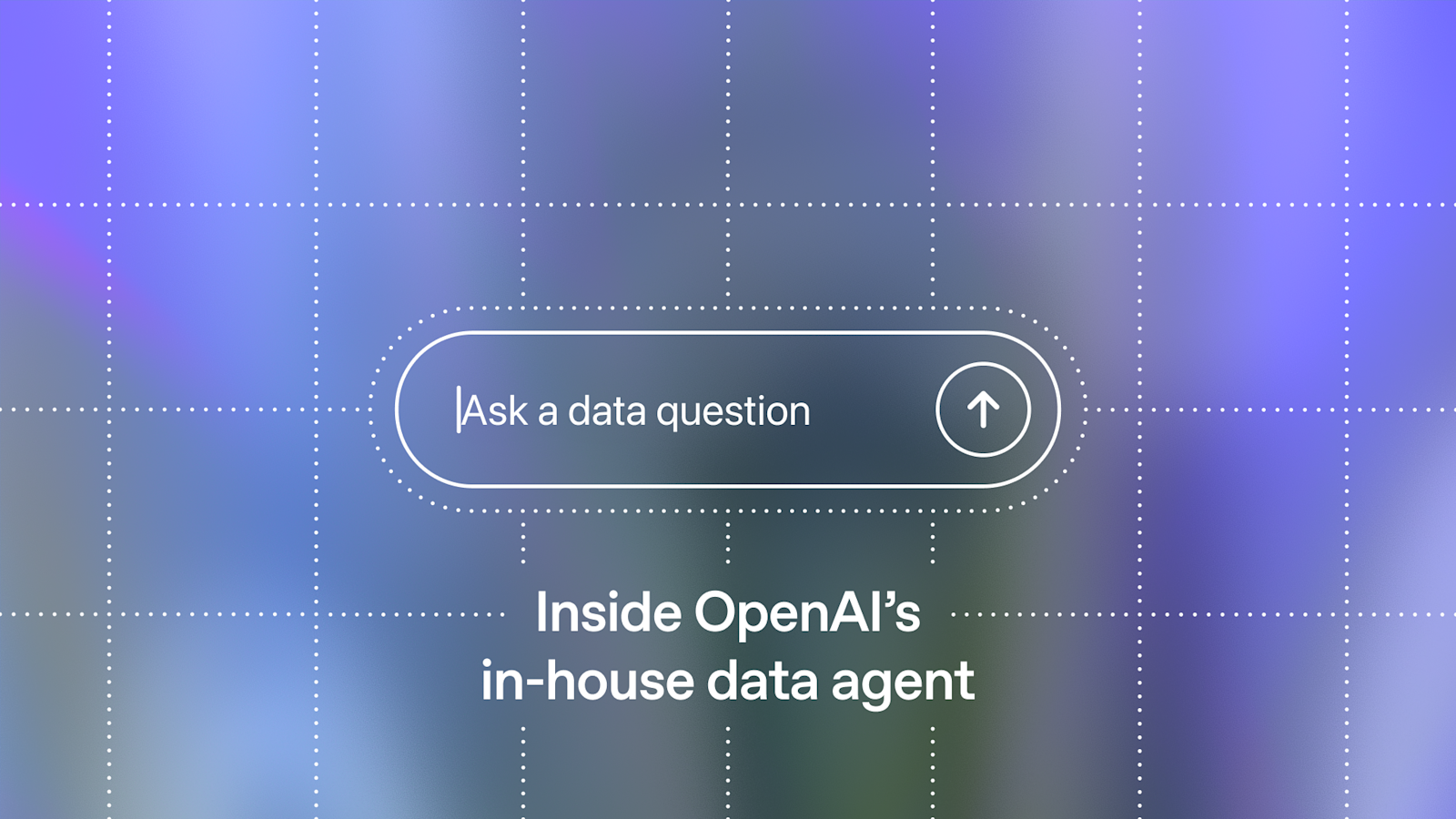
    Dash data agent is an open-source self-learning data agent inspired by OpenAI’s in-house data agent. The goal is ambitious but very practical: let teams ask questions in plain English and reliably get correct, meaningful answers grounded in real business context—not just “rows from SQL.”

    Dash data agent

    This post is a deep, enterprise-style guide. We’ll cover what Dash is, why text-to-SQL breaks in real organizations, Dash’s “6 layers of context”, the self-learning loop, architecture and deployment, security/permissions, and the practical playbook for adopting a data agent without breaking trust.

    TL;DR

    • Dash is designed to answer data questions by grounding in context + memory, not just schema.
    • It uses 6 context layers (tables, business rules, known-good query patterns, docs via MCP, learnings, runtime schema introspection).
    • The self-learning loop stores error patterns and fixes so the same failure doesn’t repeat.
    • Enterprise value comes from reliable answers + explainability + governance (permissions, auditing, safe logging).
    • Start narrow: pick 10–20 high-value questions, validate outputs, then expand coverage.

    Table of Contents

    What is Dash?

    Dash is a self-learning data agent that tries to solve a problem every company recognizes: data questions are easy to ask but hard to answer correctly. In mature organizations, the difficulty isn’t “writing SQL.” The difficulty is knowing what the SQL should mean—definitions, business rules, edge cases, and tribal knowledge that lives in people’s heads.

    Dash’s design is simple to explain: take a question, retrieve relevant context from multiple sources, generate grounded SQL using known-good patterns, execute the query, and then interpret results in a way that produces an actual insight. When something fails, Dash tries to diagnose the error and store the fix as a “learning” so it doesn’t repeat.

    Why text-to-SQL breaks in practice

    Text-to-SQL demos look amazing. In production, they often fail in boring, expensive ways. Dash’s README lists several reasons, and they match real enterprise pain:

    • Schemas lack meaning: tables and columns don’t explain how the business defines “active”, “revenue”, or “conversion.”
    • Types are misleading: a column might be TEXT but contains numeric-like values; dates might be strings; NULLs might encode business states.
    • Tribal knowledge is missing: “exclude internal users”, “ignore refunded orders”, “use approved_at not created_at.”
    • No memory: the agent repeats the same mistakes because it cannot accumulate experience.
    • Results lack interpretation: returning rows is not the same as answering a question.

    The enterprise insight is: correctness is not a single model capability. It’s a system design. You need context retrieval, validated patterns, governance, and feedback loops.

    The six layers of context (explained)

    Dash grounds answers in “6 layers of context.” Think of this as the minimum viable knowledge graph a data agent needs to behave reliably.

    Layer 1: Table usage (schema + relationships)

    This layer captures what the schema is and how tables relate. In production, the schema alone isn’t enough—but it is the starting point for safe query generation and guardrails.

    Layer 2: Human annotations (business rules)

    Human annotations encode definitions and rules. For example: “Net revenue excludes refunds”, “Active user means logged in within 30 days”, “Churn is calculated at subscription_end.” This is the layer that makes answers match how leadership talks about metrics.

    Layer 3: Query patterns (known-good SQL)

    Query patterns are the highest ROI asset in enterprise analytics. These are SQL snippets that are known to work and are accepted by your data team. Dash uses these patterns to generate queries that are more likely to be correct than “raw LLM SQL.”

    Layer 4: Institutional knowledge (docs via MCP)

    In enterprises, the most important context lives in docs: dashboards, wiki pages, product specs, incident notes. Dash can optionally pull institutional knowledge via MCP (Model Context Protocol), making the agent more “organizationally aware.”

    Layer 5: Learnings (error patterns + fixes)

    This is the differentiator: instead of repeating mistakes, Dash stores learnings like “column X is TEXT”, “this join needs DISTINCT”, or “use approved_at not created_at.” This turns debugging effort into a reusable asset.

    Layer 6: Runtime context (live schema introspection)

    Enterprise schemas change. Runtime introspection lets the agent detect changes and adapt. This reduces failures caused by “schema drift” and makes the agent more resilient day-to-day.

    The self-learning loop (gpu-poor continuous learning)

    Dash calls its approach “gpu-poor continuous learning”: it improves without fine-tuning. Instead, it learns operationally by storing validated knowledge and automatic learnings. In enterprise terms, this is important because it avoids retraining cycles and makes improvements immediate.

    In practice, your adoption loop looks like this:

    Question → retrieve context → generate SQL → execute → interpret
      - Success: optionally save as a validated query pattern
      - Failure: diagnose → fix → store as a learning

    The enterprise win is that debugging becomes cumulative. Over time, the agent becomes “trained on your reality” without needing a training pipeline.

    Reference architecture

    A practical production deployment for Dash (or any data agent) has four pieces: the agent API, the database connection layer, the knowledge/learnings store, and the user interface. Dash supports connecting to a web UI at os.agno.com, and can run locally via Docker.

    User (Analyst/PM/Eng)
      -> Web UI
         -> Dash API (agent)
            -> DB (Postgres/warehouse)
            -> Knowledge store (tables/business rules/query patterns)
            -> Learnings store (error patterns)
            -> Optional: MCP connectors (docs/wiki)

    How to run Dash locally

    Dash provides a Docker-based quick start. High level:

    git clone https://github.com/agno-agi/dash.git
    cd dash
    cp example.env .env
    
    docker compose up -d --build
    
    docker exec -it dash-api python -m dash.scripts.load_data
    docker exec -it dash-api python -m dash.scripts.load_knowledge

    Then connect a UI client to your local Dash API (the repo suggests using os.agno.com as the UI): configure the local endpoint and connect.

    Enterprise use cases (detailed)

    1) Self-serve analytics for non-technical teams

    Dash can reduce “data team bottlenecks” by letting PMs, Support, Sales Ops, and Leadership ask questions safely. The trick is governance: restrict which tables can be accessed, enforce approved metrics, and log queries. When done right, you get faster insights without chaos.

    2) Faster incident response (data debugging)

    During incidents, teams ask: “What changed?”, “Which customers are impacted?”, “Is revenue down by segment?” A data agent that knows query patterns and business rules can accelerate this, especially if it can pull institutional knowledge from docs/runbooks.

    3) Metric governance and consistency

    Enterprises often have “metric drift” where different teams compute the same metric differently. By centralizing human annotations and validated query patterns, Dash can become a layer that enforces consistent definitions across the organization.

    4) Analyst acceleration

    For analysts, Dash can act like a co-pilot: draft queries grounded in known-good patterns, suggest joins, and interpret results. This is not a replacement for analysts—it’s a speed multiplier, especially for repetitive questions.

    Governance: permissions, safety, and auditing

    Enterprise data agents must be governed. The minimum requirements:

    • Permissions: table-level and column-level access. Never give the agent broad DB credentials.
    • Query safety: restrict destructive SQL; enforce read-only access by default.
    • Audit logs: log user, question, SQL, and results metadata (with redaction).
    • PII handling: redact sensitive fields; set short retention for raw outputs.

    This is where “enterprise-level” differs from demos. The fastest way to lose trust is a single incorrect answer or a single privacy incident.

    Evaluation: how to measure correctness and trust

    Don’t measure success as “the model responded.” Measure: correctness, consistency, and usefulness. A practical evaluation framework:

    • SQL correctness: does it run and match expected results on golden questions?
    • Metric correctness: does it follow business definitions?
    • Explainability: can it cite which context layer drove the answer?
    • Stability: does it produce the same answer for the same question across runs?

    Observability for data agents

    Data agents need observability like any production system: trace each question as a run, log which context was retrieved, track SQL execution errors, and monitor latency/cost. This is where standard LLM observability patterns (audit logs, traces, retries) directly apply.

    Tools & platforms (official + GitHub links)

    FAQ

    Is Dash a replacement for dbt / BI tools?

    No. Dash is a question-answer interface on top of your data. BI and transformation tools are still foundational. Dash becomes most valuable when paired with strong metric definitions and curated query patterns.

    How do I prevent hallucinated SQL?

    Use known-good query patterns, enforce schema introspection, restrict access to approved tables, and evaluate on golden questions. Also store learnings from failures so the agent improves systematically.

    A practical enterprise adoption playbook (30 days)

    Data agents fail in enterprises for the same reason chatbots fail: people stop trusting them. The fastest path to trust is to start narrow, validate answers, and gradually expand the scope. Here’s a pragmatic 30-day adoption playbook for Dash or any similar data agent.

    Week 1: Define scope + permissions

    Pick one domain (e.g., product analytics, sales ops, support) and one dataset. Define what the agent is allowed to access: tables, views, columns, and row-level constraints. In most enterprises, the right first step is creating a read-only analytics role and exposing only curated views that already encode governance rules (e.g., masked PII).

    Then define 10–20 “golden questions” that the team regularly asks. These become your evaluation set and your onboarding story. If the agent cannot answer golden questions correctly, do not expand the scope—fix context and query patterns first.

    Week 2: Curate business definitions and query patterns

    Most failures come from missing definitions: what counts as active, churned, refunded, or converted. Encode those as human annotations. Then add a handful of validated query patterns (known-good SQL) for your most important metrics. In practice, 20–50 patterns cover a surprising amount of day-to-day work because they compose well.

    At the end of Week 2, your agent should be consistent: for the same question, it should generate similar SQL and produce similar answers. Consistency builds trust faster than cleverness.

    Week 3: Add the learning loop + monitoring

    Now turn failures into assets. When the agent hits a schema gotcha (TEXT vs INT, nullable behavior, time zones), store the fix as a learning. Add basic monitoring: error rate, SQL execution time, cost per question, and latency. In enterprise rollouts, monitoring is not optional—without it you can’t detect regressions or misuse.

    Week 4: Expand access + establish governance

    Only after you have stable answers and monitoring should you expand to more teams. Establish governance: who can add new query patterns, who approves business definitions, and how you handle sensitive questions. Create an “agent changelog” so teams know when definitions or behaviors change.

    Prompting patterns that reduce hallucinations

    Even with context, LLMs can still guess. The trick is to make the system ask itself: “What do I know, and what is uncertain?” Good prompting patterns for data agents include:

    • Require citations to context layers: when the agent uses a business rule, it should mention which annotation/pattern drove it.
    • Force intermediate planning: intent → metric definition → tables → joins → filters → final SQL.
    • Use query pattern retrieval first: if a known-good pattern exists, reuse it rather than generating from scratch.
    • Ask clarifying questions when ambiguity is high (e.g., “revenue” could mean gross, net, or recognized).

    Enterprises prefer an agent that asks one clarifying question over an agent that confidently answers the wrong thing.

    Security model (the non-negotiables)

    If you deploy Dash in an enterprise, treat it like any system that touches production data. A practical security baseline:

    • Read-only by default: the agent should not be able to write/update tables.
    • Scoped credentials: one credential per environment; rotate regularly.
    • PII minimization: expose curated views that mask PII; don’t rely on the agent to “not select” sensitive columns.
    • Audit logging: store question, SQL, and metadata (who asked, when, runtime, status) with redaction.
    • Retention: short retention for raw outputs; longer retention for aggregated metrics and logs.

    Dash vs classic BI vs semantic layer

    Dash isn’t a replacement for BI or semantic layers. Think of it as an interface and reasoning layer on top of your existing analytics stack. In a mature setup:

    • dbt / transformations produce clean, modeled tables.
    • Semantic layer defines metrics consistently.
    • BI dashboards provide recurring visibility for known questions.
    • Dash data agent handles the “long tail” of questions and accelerates exploration—while staying grounded in definitions and patterns.

    More enterprise use cases (concrete)

    5) Customer segmentation and cohort questions

    Product and growth teams constantly ask cohort and segmentation questions (activation cohorts, retention by segment, revenue by plan). Dash becomes valuable when it can reuse validated cohort SQL patterns and only customize filters and dimensions. This reduces the risk of subtle mistakes in time windows or joins.

    6) Finance and revenue reconciliation (with strict rules)

    Finance questions are sensitive because wrong answers cause real business harm. The right approach is to encode strict business rules and approved query patterns, and prevent the agent from inventing formulas. In many cases, Dash can still help by retrieving the correct approved pattern and presenting an interpretation, while the SQL remains governed.

    7) Support operations insights

    Support leaders want answers like “Which issue category spiked this week?”, “Which release increased ticket volume?”, and “What is SLA breach rate by channel?” These questions require joining tickets, product events, and release data—exactly the kind of work where context layers and known-good patterns reduce failure rates.

    Evaluation: build a golden set and run it daily

    Enterprise trust is earned through repeatability. Create a golden set of questions with expected results (or expected SQL patterns). Run it daily (or on each change to knowledge). Track deltas. If the agent’s answers drift, treat it like a regression.

    Also evaluate explanation quality: does the agent clearly state assumptions, definitions, and limitations? Many enterprise failures aren’t “wrong SQL”—they are wrong assumptions.

    Operating Dash in production

    Once deployed, you need operational discipline: backups for knowledge/learnings, a review process for new query patterns, and incident playbooks for when the agent outputs something suspicious. Treat the agent like a junior analyst: helpful, fast, but always governed.

    Guardrails: what to restrict (and why)

    Most enterprise teams underestimate how quickly a data agent can create risk. Even a read-only agent can leak sensitive information if it can query raw tables. A safe starting point is to expose only curated, masked views and to enforce row-level restrictions by tenant or business unit. If your company has regulated data (finance, healthcare), the agent should never touch raw PII tables.

    Also restrict query complexity. Allowing the agent to run expensive cross joins or unbounded queries can overload warehouses. Guardrails like max runtime, max scanned rows, and required date filters prevent cost surprises and outages.

    UI/UX: the hidden key to adoption

    Even the best agent fails if users don’t know how to ask questions. Enterprise adoption improves dramatically when the UI guides the user toward well-scoped queries, shows which definitions were used, and offers a “clarify” step when ambiguity is high. A good UI makes the agent feel safe and predictable.

    For example, instead of letting the user ask “revenue last month” blindly, the UI can prompt: “Gross or net revenue?” and “Which region?” This is not friction—it is governance translated into conversation.

    Implementation checklist (copy/paste)

    • Create curated read-only DB views (mask PII).
    • Define 10–20 golden questions and expected outputs.
    • Write human annotations for key metrics (active, revenue, churn).
    • Add 20–50 validated query patterns and tag them by domain.
    • Enable learning capture for common SQL errors and schema gotchas.
    • Set query budgets: runtime limits, scan limits, mandatory date filters.
    • Enable audit logging with run IDs and redaction.
    • Monitor: error rate, latency, cost per question, most-used queries.
    • Establish governance: who approves new patterns and definitions.

    Closing thought

    Dash is interesting because it treats enterprise data work like a system: context, patterns, learnings, and runtime introspection. If you treat it as a toy demo, you’ll get toy results. If you treat it as a governed analytics interface with measurable evaluation, it can meaningfully reduce time-to-insight without sacrificing trust.

    Extra: how to keep answers “insightful” (not just correct)

    A subtle but important point in Dash’s philosophy is that users don’t want rows—they want conclusions. In enterprises, a useful answer often includes context like: scale (how big is it), trend (is it rising or falling), comparison (how does it compare to last period or peers), and confidence (any caveats or missing data). You can standardize this as an answer template so the agent consistently produces decision-ready outputs.

    This is also where knowledge and learnings help. If the agent knows the correct metric definition and the correct “comparison query pattern,” it can produce a narrative that is both correct and useful. Over time, the organization stops asking for SQL and starts asking for decisions.

    One practical technique: store “explanation snippets” alongside query patterns. For example, the approved churn query pattern can carry a short explanation of how churn is defined and what is excluded. Then the agent can produce the narrative consistently and safely, even when different teams ask the same question in different words.

    With that, Dash becomes more than a SQL generator. It becomes a governed analytics interface that speaks the organization’s language.

    Operations: cost controls and rate limits

    Enterprise deployments need predictable cost. Add guardrails: limit max query runtime, enforce date filters, and cap result sizes. On the LLM side, track token usage per question and set rate limits per user/team. The goal is to prevent one power user (or one runaway dashboard) from turning the agent into a cost incident.

    Finally, implement caching for repeated questions. In many organizations, the same questions get asked repeatedly in different words. If the agent can recognize equivalence and reuse validated results, you get better latency, lower cost, and higher consistency.

    Done correctly, these operational controls are invisible to end users, but they keep the agent safe, affordable, and stable at scale.

    This is the difference between a demo agent and an enterprise-grade data agent.

  • Enterprise-Level Free Automation Testing Using AI | Maestro

    Enterprise-Level Free Automation Testing Using AI | Maestro

    Maestro automation testing is an open-source framework that makes UI and end-to-end testing for Android, iOS, and even web apps simple and fast. Instead of writing brittle code-heavy tests, you write human-readable YAML flows (think: “login”, “checkout”, “add to cart”) and run them on emulators, simulators, or real devices. For enterprise teams, Maestro’s biggest promise is not just speed—it’s trust: fewer flaky tests, faster iteration, and better debugging artifacts.

    Maestro automation testing

    This guide explains how to do enterprise-level free automation testing using AI with Maestro. “AI” here doesn’t mean “let a model click random buttons.” It means using AI to accelerate authoring, maintenance, and triage—while keeping the test execution deterministic. We’ll cover the test architecture, selector strategy, CI/CD scaling, reporting, governance, and an AI-assisted workflow that developers will actually trust.

    TL;DR

    • Maestro automation testing uses YAML flows + an interpreted runner for fast iteration (no compile cycles).
    • Built-in smart waiting reduces flakiness—less manual sleep(), fewer timing bugs.
    • Enterprise success comes from: stable selectors, layered suites (smoke/regression), parallel CI, and artifacts.
    • Use AI for drafting flows, repair suggestions, and failure summaries—not for non-deterministic execution.
    • If you implement this workflow, you can run hundreds of E2E tests per PR with clear, actionable failures.

    Table of Contents

    What is Maestro?

    Maestro is an open-source UI automation framework built around the idea of flows: small, testable parts of a user journey such as login, onboarding, checkout, or search. You define flows in YAML using high-level commands (for example: launchApp, tapOn, inputText, assertVisible), and Maestro executes them on real environments.

    Maestro’s design decisions map well to enterprise needs:

    • Interpreted execution: flows run immediately; iteration is fast.
    • Smart waiting: Maestro expects UI delays and waits automatically (instead of hardcoding sleeps everywhere).
    • Cross-platform mindset: Android + iOS coverage without duplicating everything.

    What “enterprise-level” testing actually means

    Enterprise automation testing fails when it becomes expensive, flaky, and ignored. “Enterprise-level” doesn’t mean “10,000 tests.” It means:

    • Trustworthiness: tests fail only when something is truly broken.
    • Fast feedback: PR checks complete quickly enough to keep developers unblocked.
    • Clear artifacts: screenshots/logs/metadata that make failures easy to debug.
    • Repeatability: pinned environments to avoid drift.
    • Governance: secure accounts, secrets, auditability.

    The best enterprise teams treat automation as a product: they invest in selector contracts, stable environments, and failure triage workflows. The payoff is compounding: fewer regressions, less manual QA, and faster releases.

    Why Maestro (vs Appium/Espresso/XCTest)

    Appium, Espresso, and XCTest are all valid choices, but they optimize for different tradeoffs. Appium is flexible and cross-platform, but many teams fight stability (driver flakiness, timing, brittle locators). Espresso/XCTest are deep and reliable within their platforms, but cross-platform suites often become duplicated and costly.

    Maestro automation testing optimizes for a fast authoring loop and stability via smart waiting and high-level commands. That makes it especially good for end-to-end flows where you want broad coverage with minimal maintenance.

    Team-friendly setup (local + CI)

    For enterprise adoption, installation must be repeatable. Maestro requires Java 17+. Then install the CLI:

    java -version
    curl -fsSL "https://get.maestro.mobile.dev" | bash
    maestro --version

    Best practice: pin versions in CI and in developer setup scripts. If your automation toolchain is floating, you’ll get intermittent failures that look like product regressions. Consider using a single CI container image that includes Java + Maestro + Android SDK tooling (and Xcode runner on macOS when needed).

    Test suite architecture (folders, sharding, environments)

    Organize your Maestro suite like a real repo. Here’s a structure that scales:

    maestro/
      flows/
        smoke/
        auth/
        onboarding/
        checkout/
        profile/
      common/
        login.yaml
        logout.yaml
        navigation.yaml
      env/
        staging.yaml
        qa.yaml
      data/
        test_users.json
      scripts/
        run_smoke.sh
        shard_flows.py

    Enterprises rarely run “everything” on every PR. Instead:

    • Smoke (PR): 5–20 flows that validate the app is not broken.
    • Critical paths (PR): payments/auth if your risk profile requires it.
    • Regression (nightly): broader suite with more devices and edge cases.

    Sharding is your friend. Split flows by folder or tag and run them in parallel jobs. Enterprise throughput comes from parallelism and stable environments.

    Writing resilient YAML flows

    Resilient flows are short, deterministic, and assert outcomes. Keep actions and assertions close. Avoid mega flows that test everything at once—those are expensive to debug and become flaky as the UI evolves.

    Example (illustrative):

    appId: com.example.app
    ---
    - launchApp
    - tapOn:
        id: screen.login.email
    - inputText: "qa@example.com"
    - tapOn:
        id: screen.login.continue
    - assertVisible:
        id: screen.home.welcome

    Flow design tips that reduce enterprise flake rate:

    • Assert important UI state after major steps (e.g., after login, assert you’re on home).
    • Prefer “wait for visible” style assertions over manual delays.
    • Keep flows single-purpose and composable (login flow reused by multiple journeys).

    Selectors strategy (the #1 flakiness killer)

    Most flaky tests are flaky because selectors are unstable. Fix this with a selector contract:

    • Prefer stable accessibility IDs / testIDs over visible text.
    • Use a naming convention (e.g., screen.checkout.pay_button).
    • Enforce it in code review (tests depend on it).

    If you do one thing for enterprise automation quality, do this. It reduces maintenance more than any other practice—including AI tooling.

    Test data & environments

    Enterprises waste huge time debugging failures that are actually environment problems. Make test data reproducible:

    • Dedicated test users per environment (staging/QA), rotated regularly.
    • Seed backend state (a user with no cart, a user with active subscription, etc.).
    • Sandbox third-party integrations (payments, OTP) to avoid real-world side effects.

    When test data is stable, failures become actionable and developer trust increases.

    Using AI for enterprise automation testing (safely)

    AI makes sense for automation testing when it reduces human effort in authoring and debugging. The golden rule: keep the runner deterministic. Use AI around the system.

    AI use case #1: Generate flow drafts

    Give AI a user story and your selector naming rules. Ask it to produce a draft YAML flow. Your engineers then review and add assertions. This reduces the “blank page” problem.

    AI use case #2: Suggest repairs after UI changes

    When tests fail due to UI changes, AI can propose selector updates. Feed it the failing flow, the new UI hierarchy (or screenshot), and your selector rules. Keep a human in the loop, and prefer stable IDs in code rather than brittle text matches.

    AI use case #3: Summarize failures

    For each failed run, collect artifacts (screenshots, logs, device metadata). AI can generate a short “probable root cause” summary. This is where enterprise productivity wins are huge—developers spend less time reproducing failures locally.

    Do not use AI to dynamically locate elements during execution. That creates non-reproducible behavior and destroys trust in the suite.

    CI/CD scaling: parallel runs + stability

    Enterprise CI is about throughput. Common patterns:

    • Shard flows across parallel jobs (by folder or tag).
    • Run smoke flows on every PR; regression nightly.
    • Pin emulator/simulator versions.
    • Always upload artifacts for failures.

    Example GitHub Actions skeleton (illustrative):

    name: maestro-smoke
    on: [pull_request]
    jobs:
      android-smoke:
        runs-on: ubuntu-latest
        steps:
          - uses: actions/checkout@v4
          - name: Install Maestro
            run: curl -fsSL "https://get.maestro.mobile.dev" | bash
          - name: Run smoke flows
            run: maestro test maestro/flows/smoke

    In real enterprise setups, you’ll also set up Android emulators/iOS simulators, cache dependencies, and upload artifacts. The architecture section above makes sharding and artifact retention straightforward.

    Maestro Studio & Maestro Cloud (when to use them)

    Maestro also offers tools like Maestro Studio (a visual IDE for flows) and Maestro Cloud (parallel execution/scalability). In enterprise teams, these are useful when:

    • You want non-developers (QA/PM) to contribute to flow creation and debugging.
    • You need large-scale parallel execution across many devices without building your own device farm.
    • You want standardized reporting across teams.

    Even if you stay fully open-source, the same principles apply: parallelism, stable selectors, and strong artifacts.

    Reporting, artifacts, and debugging workflow

    The real cost of UI automation is debugging time. Reduce it by making failures self-explanatory:

    • Screenshots on failure (and ideally at key checkpoints).
    • Logs with timestamps and step names.
    • Metadata: app version, commit SHA, OS version, device model.

    With good artifacts, AI summarization becomes reliable and fast.

    Governance: access, secrets, compliance

    Enterprise testing touches real services and accounts. Treat your test system like production:

    • Store secrets in CI vaults (never hardcode into flows).
    • Use dedicated test tenants and rotate credentials.
    • Maintain audit logs for actions triggered by tests (especially if they cause emails/SMS in sandbox).

    Metrics: how to prove ROI to leadership

    Track metrics that leadership understands:

    • Flake rate: false failures / total failures.
    • Mean time to diagnose: time from failed CI to actionable fix.
    • Critical path coverage: number of high-value flows automated.
    • Release stability: fewer hotfixes and rollbacks.

    Migration plan (from Appium / existing suites)

    Enterprises don’t switch overnight. A safe migration plan:

    • Start with 5–10 smoke flows that cover the highest business risk.
    • Implement selector contracts in the app (testIDs/accessibility IDs).
    • Run Maestro in CI alongside existing suites for 2–4 weeks.
    • Once trust is established, move critical end-to-end flows to Maestro and reduce legacy suite scope.

    Common pitfalls (and how to avoid them)

    • Pitfall: no stable selector contract → Fix: IDs + naming conventions.
    • Pitfall: mega flows → Fix: small flows with checkpoints.
    • Pitfall: environment drift → Fix: pinned device images + seeded data.
    • Pitfall: AI in the runner → Fix: AI only for authoring/triage.

    Tools & platforms (official + GitHub links)

    FAQ

    Is Maestro really free for enterprise use?

    Yes for the core framework (open source). Your real costs are devices, CI minutes, and maintenance. The practices above reduce maintenance and make the suite trustworthy.

    How do I keep tests stable across redesigns?

    Stable IDs. UI redesigns change layout and text, but they should not change testIDs. Treat the selector contract as an API and preserve it across refactors.

    A practical 30-day enterprise adoption playbook

    Most enterprise testing initiatives fail because they start with “let’s automate everything.” That leads to a large, flaky suite that no one trusts. A better strategy is to treat Maestro like a product rollout. You don’t need 500 tests to create confidence—you need 20 tests that are stable, meaningful, and run on every PR.

    Week 1 should focus on foundations. Pick a single environment (staging or QA), define test accounts, and add stable testIDs/accessibility IDs to the app. The selector contract is your automation API. If you skip it, your suite will rot. At the end of Week 1, you should be able to run 2–3 smoke flows locally and in CI.

    Week 2 is about reliability. Add artifacts (screenshots/logs), run the same flows across a small device matrix, and tune any unstable steps. This is where teams typically learn that flakiness is not random: it’s caused by unstable selectors, asynchronous UI states, missing waits, or environment instability. Fixing the top 3 sources of flake often removes 80% of failures.

    Week 3 is about scaling. Expand to 10–20 PR smoke flows, shard them in parallel, and introduce nightly regressions. Add a quarantine process: if a test flakes twice in a day, it gets quarantined (removed from PR gate) until fixed. This keeps developer trust high while still allowing the suite to grow.

    Week 4 is about enterprise polish. Integrate results into your reporting system (Slack notifications, dashboards), standardize run metadata (commit SHA, app version, device), and define ownership. Every critical flow should have an owner and an SLA for fixing failures. This is how test automation becomes a reliable engineering signal instead of a “QA tool.”

    Enterprise use cases: where Maestro creates the most value

    Maestro can be used for almost any UI automation, but enterprise ROI is highest when you focus on flows that are expensive to debug manually or risky to ship without confidence. In practice, these are not “tiny UI interactions.” They are end-to-end journeys where multiple systems touch the user experience.

    Use case 1: Release gating (smoke suite on every PR)

    The most direct enterprise value is gating releases. Your PR checks should validate that the app launches, login works, the main navigation is functional, and one or two business-critical actions complete. These are not exhaustive tests—they are high-signal guardrails. With Maestro’s YAML flows and smart waiting, you can keep these checks fast and stable.

    The key design decision is scope: your smoke suite should be small enough to run in 10–20 minutes, even with device matrix. Anything longer will get skipped under deadline pressure. When a smoke test fails, it must be obvious why, and the developer should be able to reproduce it locally with the same flow.

    Use case 2: Mobile regression testing for cross-platform stacks

    Teams building with React Native, Flutter, or hybrid webviews often struggle with automation: platform-specific tooling diverges and maintenance costs increase. Maestro’s cross-platform approach is useful here because the same flow logic often applies across Android and iOS, especially when your selector contract is consistent. You still need platform-specific device setup, but you avoid writing two completely different suites.

    Enterprise practice: run nightly regressions on a wider matrix (multiple OS versions, different screen sizes). Don’t block PRs with the full matrix; instead, block PRs with a minimal matrix and catch deeper issues nightly.

    Use case 3: Checkout and payments verification (high-risk flows)

    Payments and checkout are high-risk and expensive to break. Maestro is a strong fit for verifying that cart operations, promo code flows, address validation, and payment sandbox behavior still work after changes. The enterprise trick is to keep these flows deterministic: use seeded test accounts, known products, and sandbox providers so that failures reflect real regressions rather than environmental randomness.

    When this is done well, you avoid the most costly class of bugs: regressions discovered only after release. In many organizations, preventing one payment regression pays for the entire automation effort.

    AI-assisted authoring: prompts that actually work

    AI works best when you give it constraints. If you ask “write a Maestro test,” you’ll get a generic flow. Instead, give it your selector conventions, your app structure, and examples of existing flows. Then ask it to generate a new flow that matches your repository style.

    Here is a prompt template that works well in practice:

    You are writing Maestro YAML flows.
    Rules:
    - Prefer tapOn/assertVisible by id (testID), not by visible text.
    - Use our naming convention: screen.<screen>.<element>
    - Keep flows short, with at least 1 assertion after major steps.
    
    Existing flow examples:
    <paste 1-2 existing YAML flows>
    
    Task:
    Write a new flow for: "User logs in, opens profile, updates display name, saves, and verifies the new name is visible."

    After AI generates the flow, you still review it like code. In enterprises, this becomes a powerful workflow: QA writes intent in plain English, AI drafts the flow, engineers enforce selectors and assertions.

    Maintenance strategy: keeping the suite healthy

    The enemy of enterprise automation is “slow decay.” A suite becomes flaky over months because UI changes accumulate, environments drift, and no one owns upkeep. Prevent decay with three habits: ownership, quarantine, and regular refactoring.

    Ownership means every critical flow has a team owner. When failures happen, that team fixes them or escalates. Without ownership, failures become background noise.

    Quarantine means flaky tests don’t block PRs forever. If a test flakes repeatedly, you move it out of PR gating and track it as work. This keeps trust high while still acknowledging the gap.

    Refactoring means you periodically consolidate flows, extract common steps (login, navigation), and remove duplication. YAML makes this easier than many code-based suites, but the discipline is still required.

    Conclusion

    Maestro is a strong foundation for enterprise-level, free UI automation because it optimizes for readability, speed, and resilience. Combine it with a selector contract, stable environments, CI sharding, and good artifacts—and you get a test signal developers will trust.

    Use AI to accelerate the human work (authoring and triage), but keep the test runner deterministic. That’s the difference between “AI-powered testing” that scales and “AI testing” that becomes chaos.

    Advanced enterprise patterns (optional, but high impact)

    Once your smoke suite is stable, you can adopt advanced patterns that increase confidence without exploding maintenance. One pattern is contract-style UI assertions: for critical screens, assert that a set of expected elements exists (key buttons, titles, and error banners). This catches broken layouts early. Keep these checks small and focus only on what truly matters.

    Another pattern is rerun-once policy for known transient failures. Enterprises often allow a single rerun for tests that fail due to temporary device issues, but they track rerun rates as a metric. If rerun rates rise, that’s a signal of environment instability or hidden flakiness. The point is not to hide failures; it’s to prevent one noisy device from blocking every PR.

    A third pattern is visual baselines for a handful of screens. You don’t need full visual regression testing everywhere. Pick a few high-traffic screens (home, checkout) and keep a baseline screenshot per device class. When UI changes intentionally, update baselines in the same PR. When changes are accidental, you catch them immediately.

    Finally, add ownership and SLAs. Enterprises win when failing flows are owned and fixed quickly. If a flow stays broken for weeks, the suite loses trust. A simple rule like “critical smoke failures must be fixed within 24 hours” protects the credibility of your automation.

    If you follow the rollout discipline and keep selectors stable, Maestro scales cleanly in large organizations. The biggest unlock is cultural: treat automation failures as engineering work with owners, not as “QA noise.” That’s how you get enterprise confidence without enterprise cost.

    Once this is in place, adding new flows becomes routine and safe: new screens ship with testIDs, flows get drafted with AI and reviewed like code, and CI remains fast through sharding. That is the enterprise-grade loop.

  • Best Real-time Interactive AI Avatar Solution for Mobile Devices | Duix Mobile

    Best Real-time Interactive AI Avatar Solution for Mobile Devices | Duix Mobile

    Duix Mobile AI avatar is an open-source SDK for building a real-time interactive AI avatar experience on mobile devices (iOS/Android) and other edge screens. The promise is a character-like interface that can listen, respond with speech, and animate facial expressions with low latency—while keeping privacy and reliability high via on-device oriented execution.

    This is a production-minded guide (not a short announcement). We’ll cover the real-time avatar stack (ASR → LLM → TTS → rendering), latency budgets on mobile, detailed use cases with paragraphs, and a practical implementation plan to go from demo to a shippable avatar experience.

    TL;DR

    • Duix Mobile AI avatar is a modular SDK for building real-time avatars on mobile/edge.
    • Great avatars are a systems problem: streaming ASR + streaming LLM + streaming TTS + interruption (barge-in).
    • Most real apps use a hybrid architecture: some parts on-device, some in the cloud.
    • Avatars win when conversation is the product: support, coaching, education, kiosks/automotive.
    • To ship, prioritize time-to-first-audio, barge-in stop time, safety policies, and privacy-first telemetry.

    Table of Contents

    What is Duix Mobile?

    Duix Mobile is an open-source SDK from duix.com designed to help developers create interactive avatars on mobile and embedded devices. Instead of only producing text, the SDK is built around a “voice + face” loop: capture speech, interpret intent, generate a response, synthesize speech, and animate an avatar with lip-sync and expressions.

    The core product value is not a single model. It’s the integration surface and real-time behaviors. That’s why modularity matters: you can plug in your own LLM, ASR, and TTS choices, and still keep a consistent avatar experience across iOS and Android.

    Why real-time AI avatars are trending

    Text chat proved that LLMs can be useful. Avatars are the next layer because they match how humans communicate: voice, expressions, turn-taking, and the feeling of presence. On mobile, the interface advantage is even stronger because typing is slow and many contexts are hands-busy.

    But avatars also raise expectations. Users expect the system to respond quickly, to sound natural, and to handle interruptions like a real conversation. This is why latency, streaming, VAD, and buffering are product features, not background infrastructure.

    When an AI avatar beats a chatbot

    Use an avatar when conversation is the experience. If the user wants a quick factual answer, text is cheaper and clearer. A Duix Mobile AI avatar wins when the user needs guidance, emotional tone, or a persistent character (support, coaching, tutoring). It also wins when the user can’t type reliably (walking, cooking, driving) and needs voice-first interaction.

    However, avatars are unforgiving: users judge them like humans. A slightly weaker model with fast, interruptible speech often feels better than a “smarter” model that responds late.

    Real-time avatar stack (ASR → LLM → TTS → rendering)

    Think of a mobile AI avatar as a streaming pipeline:

    Mic audio
      -> VAD (detect speech start/stop)
      -> Streaming ASR (partial + final transcript)
      -> Dialogue manager (state, memory, tool routing)
      -> LLM (streaming tokens)
      -> Safety filters + formatting
      -> Streaming TTS (audio frames)
      -> Avatar animation (lip-sync + expressions)
      -> Playback + UI states

    Two implementation details matter more than most people expect: (1) the “chunking strategy” between stages (how big each partial transcript / text chunk is), and (2) cancellation behavior (how quickly the system stops downstream work after an interruption). Both directly determine perceived responsiveness.

    Latency budgets and measurements

    To make avatars feel real-time, track stage-level metrics and optimize the worst offender. A practical set of metrics:

    • ASR partial latency (mic → first partial transcript)
    • ASR final latency (mic → final transcript)
    • LLM first-token latency (transcript → first token)
    • TTS TTFA (first text chunk → first audio frame)
    • Barge-in stop time (user starts → avatar audio stops)
    • End-to-end perceived latency (user stops → avatar begins)

    As a rule of thumb, users forgive long answers, but they hate long silence. This is why time-to-first-audio and backchannel acknowledgements are often the biggest UX improvements.

    Use cases (deep dive)

    Below are use cases where real-time avatars deliver measurable business value. Each section explains how the flow works, what integrations you need, and what to watch out for in production.

    1) Customer support avatar (mobile apps)

    Support is a perfect avatar use case because users often arrive stressed and want guided resolution. A voice avatar can triage quickly, ask clarifying questions, and guide step-by-step troubleshooting. It can also gather the right metadata (device model, app version, recent actions) and create a structured ticket for escalation.

    In production, the avatar should behave like a workflow system rather than a free-form chatbot. For example, a banking support avatar must verify identity before it can reveal account details. A telecom support avatar must avoid “guessing” outage causes and instead fetch status from verified systems.

    Integrations: CRM/ticketing, account APIs, knowledge base retrieval, OTP verification, escalation handoff.

    What breaks prototypes: unsafe tool calls, hallucinated policy answers, and bad authentication UX. Fix these with strict tool schemas, validation, and “safe-mode” fallbacks.

    2) Virtual doctor / health intake avatar

    A health avatar is best positioned as structured intake, not diagnosis. It asks symptom questions, captures structured responses, and helps route the user to the right next step. The avatar format improves completion because the conversation feels supportive instead of clinical form-filling.

    Integrations: structured intake forms, scheduling, multilingual support, escalation policies.

    Production constraints: strict safety templates, disclaimers, crisis escalation, and privacy-first retention controls for transcripts and audio.

    3) Education tutor avatar

    Education is about engagement and practice. A tutor avatar can role-play scenarios for language learners, correct pronunciation, and keep pacing natural. For exam prep, it can ask questions, grade answers, and explain mistakes. The real-time voice loop creates momentum and keeps learners practicing longer.

    Implementation tip: design the tutor as a curriculum engine, not a general chatbot. Use structured rubrics to keep feedback consistent and measurable, and store progress in a safe, user-controlled profile.

    4) Lead qualification / sales avatar

    Sales avatars work when the product has high intent and the user wants guidance. The avatar asks targeted questions, routes the user to the right plan, and schedules a demo. Voice-first feels like a concierge and can lift conversion by reducing friction.

    Production constraints: compliance. Use retrieval-backed answers for pricing/features and enforce refusal policies for unsupported claims.

    5) Kiosks, smart screens, and automotive

    Edge screens are where on-device orientation becomes a major advantage. Networks are unreliable, environments are noisy, and latency must be predictable. An avatar can guide users step-by-step (“tap here”, “scan this”), handle interruptions, and provide a consistent interface across device types.

    Engineering focus: noise-robust ASR, strong VAD tuning, and strict safety constraints (especially in automotive). Short, actionable responses are better than long explanations.

    UX patterns that make avatars feel human

    To make a Duix Mobile AI avatar feel human, you need reliable turn-taking and visible state. The avatar should clearly show when it’s listening, thinking, and speaking. Add short acknowledgements (“Okay”, “Got it”) when appropriate. Most importantly: interruption must work every time.

    Also design the “idle experience.” What happens when the user stays silent? The avatar should not nag, but gentle prompts and a clear microphone indicator improve trust and usability.

    Reference architecture (on-device + cloud)

    A common production architecture is hybrid. On-device handles capture, VAD, rendering, and sometimes lightweight speech. Cloud handles heavy reasoning and tools. The key is a streaming protocol between components so the UI stays responsive even when cloud calls slow down.

    Choosing ASR/LLM/TTS (practical tradeoffs)

    Pick components based on streaming, predictability, and language support. For ASR, prefer partial transcripts and robustness. For LLMs, prefer streaming tokens and controllability (schemas/tool validation). For TTS, prioritize time-to-first-audio and barge-in support.

    If you expect high latency from a large LLM, consider a two-stage approach: a fast small-model acknowledgement + clarification, followed by a richer explanation from a larger model. This can make the avatar feel responsive without sacrificing quality.

    Implementation plan (iOS/Android)

    A pragmatic rollout plan looks like this: start with demo parity (end-to-end loop working), then focus on real-time quality (streaming + barge-in + instrumentation), then productize (safety, integrations, analytics, memory policies). This prevents you from building breadth before the core feels good.

    Performance tuning on mobile (thermal, FPS, batching)

    Mobile performance is not just CPU/GPU speed. Thermal throttling and battery constraints can ruin an avatar experience after a few minutes. Practical tips:

    Keep render FPS stable. If the avatar animation stutters, it feels broken even when the voice is fine. Optimize rendering workload and test on mid-range devices.

    Batch smartly. Larger audio/text chunks reduce overhead but increase latency. Tune chunk sizes until TTFA and barge-in feel right.

    Control background tasks. Avoid heavy work on the UI thread, and prioritize audio scheduling. In many systems, bad thread scheduling causes “random” latency spikes.

    Product strategy: narrow workflows, monetization, and rollout

    Avatars are expensive compared to chat because you run ASR + TTS + rendering and sometimes large models. The safest way to ship is to start narrow: one workflow, one persona, one voice. Make it delightful. Then expand. This also makes monetization clearer: you can charge for a premium workflow (support, tutoring) instead of “general chat.”

    Measure ROI with task completion, session length, repeat usage, and deflection (in support). If an avatar increases retention or reduces support cost, the extra compute is worth it.

    Observability and debugging

    Real-time avatars need observability. Track stage-level latency and failure reasons. Use anonymized run IDs so you can debug without storing raw transcripts. If you do store transcripts for evaluation, keep retention short and restrict access.

    Privacy, safety, and compliance

    Voice and transcripts are sensitive user data. Make consent clear, redact identifiers, keep retention short, and log actions rather than raw speech. If your avatar performs actions (bookings, payments), enforce strict tool validation and audit logs.

    Evaluation and benchmarks

    Evaluate timeliness (TTFA, barge-in), task success, coherence, safety, and user satisfaction. Test under noise and weak networks. Also test on mid-range devices, because that’s where many impressive demos fail in the real world.

    Tools & platforms

    FAQ

    Can I run everything on-device?

    Sometimes, but it depends on quality targets and device constraints. Many teams use a hybrid setup. The most important goal is a real-time UX regardless of where the computation happens.

    What should I build first?

    Start with one narrow workflow. Make streaming and barge-in excellent. Then add integrations and broader capabilities.

  • Stack for Real-Time Video, Audio, and Data | LiveKit

    Stack for Real-Time Video, Audio, and Data | LiveKit

    LiveKit real-time video is a developer-friendly stack for building real-time video, audio, and data experiences using WebRTC. If you’re building AI agents that can join calls, live copilots, voice assistants, or multi-user streaming apps, LiveKit gives you the infrastructure layer: an SFU server, client SDKs, and production features like auth, TURN, and webhooks.

    LiveKit real-time video

    TL;DR

    • LiveKit is an open-source, scalable WebRTC SFU (selective forwarding unit) for multi-user conferencing.
    • It ships with modern client SDKs and supports production needs: JWT auth, TURN, webhooks, multi-region.
    • For AI apps, it’s a strong base for real-time voice/video agents and copilots.

    Table of Contents

    What is LiveKit?

    LiveKit is an open-source project that provides scalable, multi-user conferencing based on WebRTC. At its core is a distributed SFU that routes audio/video streams efficiently between participants. Around that, LiveKit provides client SDKs, server APIs, and deployment patterns to run it in production.

    Key features (SFU, SDKs, auth, TURN)

    • Scalable WebRTC SFU for multi-user calls
    • Client SDKs for modern apps
    • JWT authentication and access control
    • Connectivity: UDP/TCP/TURN support for tough networks
    • Deployment: single binary, Docker, Kubernetes
    • Extras: speaker detection, simulcast, selective subscription, moderation APIs, webhooks

    Use cases (AI voice/video agents)

    • Real-time voice agents that join calls and respond with low latency
    • Meeting copilots: live transcription + summarization + action items
    • Live streaming copilots for creators
    • Interactive video apps with chat/data channels

    Reference architecture

    Clients (web/mobile)
      -> LiveKit SFU (WebRTC)
         -> Webhooks / Server APIs
         -> AI services (ASR, LLM, TTS)
         -> Storage/analytics (optional)

    Getting started

    Start with the official docs and demos, then decide whether to use LiveKit Cloud or self-host (Docker/K8s). For AI assistants, the key is designing a tight latency budget across ASR → LLM → TTS while your agent participates in the call.

    Tools & platforms (official + GitHub links)

  • Video LLM for Real-Time Commentary with Streaming Speech Transcription | LiveCC

    Video LLM for Real-Time Commentary with Streaming Speech Transcription | LiveCC

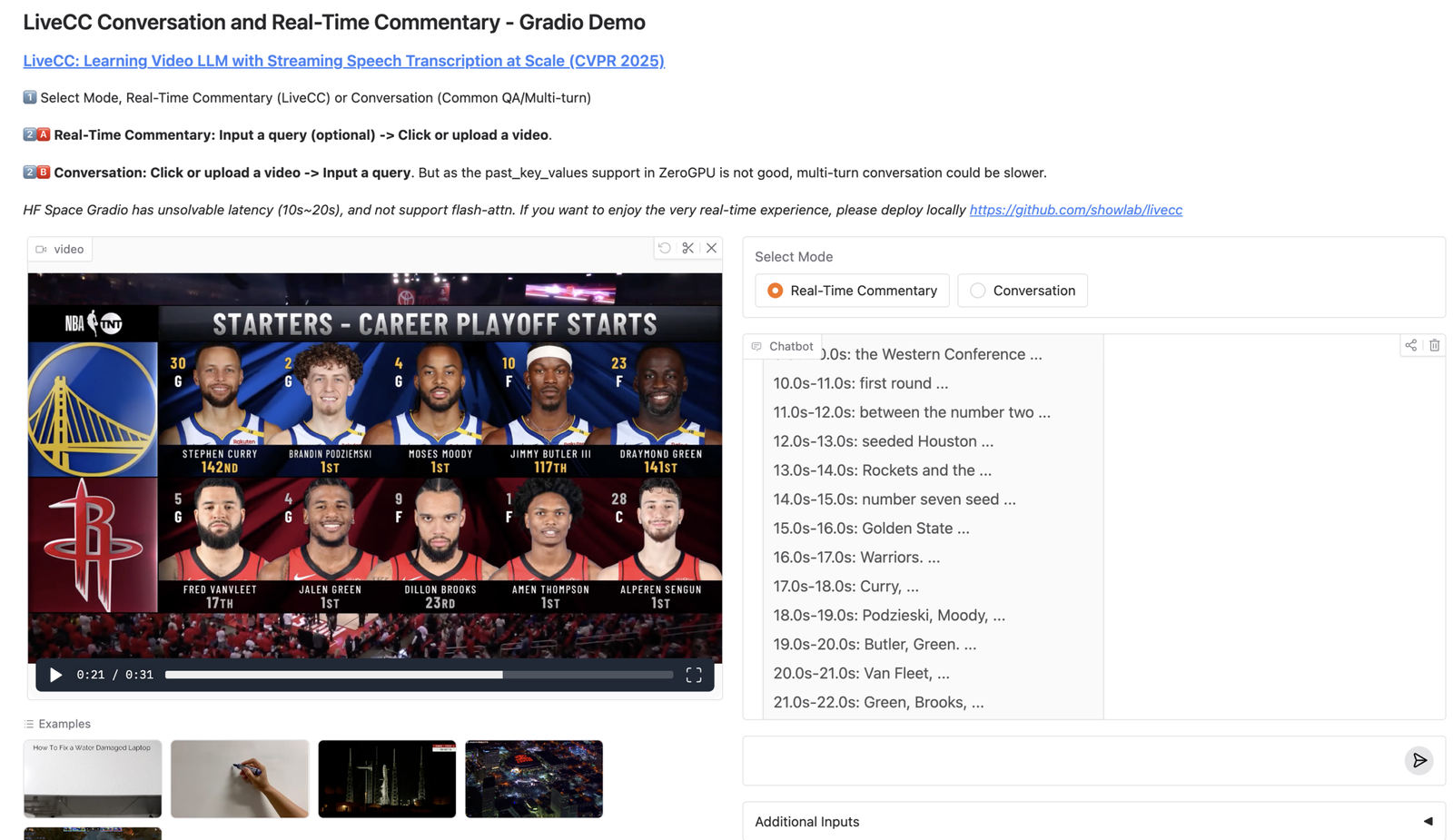
    LiveCC video LLM is an open-source project that trains a video LLM to generate real-time commentary while the video is still playing, by pairing video understanding with streaming speech transcription. If you’re building live sports commentary, livestream copilots, or real-time video assistants, this is a practical reference implementation to study.

    LiveCC video LLM

    In this post, I’ll break down what LiveCC is, why streaming ASR changes the game for video LLMs, how the workflow looks end-to-end, and how you can run the demo locally.

    TL;DR

    • LiveCC focuses on real-time video commentary, not only offline captioning.
    • The key idea: training with a video + ASR streaming method so the model learns incremental context.
    • You can try it via a Gradio demo and CLI.
    • For production, you still need latency control, GPU planning, and safe logging/retention.

    Table of Contents

    What is LiveCC?

    LiveCC (“Learning Video LLM with Streaming Speech Transcription at Scale”) is a research + engineering release from ShowLab that demonstrates a video-language model capable of generating commentary in real time. Unlike offline video captioning, real-time commentary forces the system to deal with incomplete information: the next scene hasn’t happened yet, audio arrives continuously, and latency is a hard constraint.

    Why streaming speech transcription matters

    Most video-LMM pipelines treat speech as a static transcript. In live settings, speech arrives as a stream, and your model needs to update context as new words come in. Streaming ASR gives you incremental context, better time alignment, and lower perceived latency (fast partial outputs beat perfect delayed outputs).

    End-to-end workflow (how LiveCC works)

    Video stream + Audio
      -> Streaming ASR (partial transcript)
      -> Video frame sampling / encoding
      -> Video LLM (multimodal reasoning)
      -> Real-time commentary output (incremental)

    When you read the repo, watch for the timestamp monitoring (Gradio demo) and how they keep the commentary aligned even with network jitter.

    Use cases

    • Live sports: play-by-play, highlights, tactical explanations
    • Livestream copilots: summarize what’s happening for viewers joining late
    • Accessibility: live captions + scene narration
    • Ops monitoring: “what is happening now” summaries for camera feeds

    How to run the LiveCC demo

    Quick start (from the README):

    pip install torch torchvision torchaudio
    pip install "transformers>=4.52.4" accelerate deepspeed peft opencv-python decord datasets tensorboard gradio pillow-heif gpustat timm sentencepiece openai av==12.0.0 qwen_vl_utils liger_kernel numpy==1.24.4
    pip install flash-attn --no-build-isolation
    pip install livecc-utils==0.0.2
    
    python demo/app.py --js_monitor

    Note: --js_monitor uses JavaScript timestamp monitoring. The README recommends disabling it in high-latency environments.

    Production considerations

    • Latency budget: pick a target and design for it (partial vs final outputs).
    • GPU sizing: real-time workloads need predictable throughput.
    • Safety + privacy: transcripts are user data; redact and keep retention short.
    • Evaluation: measure timeliness, not only correctness.

    Tools & platforms (official + GitHub links)

  • Routing Traces, Metrics, and Logs for LLM Agents (Pipelines + Exporters) | OpenTelemetry Collector

    Routing Traces, Metrics, and Logs for LLM Agents (Pipelines + Exporters) | OpenTelemetry Collector

    OpenTelemetry Collector for LLM agents: The OpenTelemetry Collector is the most underrated piece of an LLM agent observability stack. Instrumenting your agent runtime is step 1. Step 2 (the step most teams miss) is operationalizing telemetry: routing, batching, sampling, redaction, and exporting traces/metrics/logs to the right backend without rewriting every service.

    OpenTelemetry Collector for LLM agents

    If you are building agents with tool calling, RAG, retries, and multi-step plans, your system generates a lot of spans. The Collector lets you keep what matters (errors/slow runs) while controlling cost and enforcing governance centrally.

    TL;DR

    • Think of the Collector as a programmable telemetry router: OTLP in → processors → exporters out.
    • For LLM agents, the Collector is where you enforce consistent attributes like run_id, tool.name, prompt.version, llm.model, and tenant.
    • Use tail sampling so you keep full traces for failed/slow runs and downsample successful runs.
    • Implement redaction at the Collector layer so you never leak PII/secrets into your trace backend.
    • Export via OTLP/Jaeger/Tempo/Datadog/New Relic-without touching app code.

    Table of Contents

    What is the OpenTelemetry Collector?

    The OpenTelemetry Collector is a vendor-neutral service that receives telemetry (traces/metrics/logs), processes it (batching, filtering, sampling, attribute transforms), and exports it to one or more observability backends.

    Instead of configuring exporters inside every microservice/agent/tool, you standardize on sending OTLP to the Collector. From there, your team can change destinations, apply policy, and manage cost in one place.

    Why LLM agents need the Collector (not just SDK instrumentation)

    • Central policy: enforce PII redaction, attribute schema, and retention rules once.
    • Cost control: agents generate high span volume; the Collector is where sampling and filtering becomes practical.
    • Multi-backend routing: send traces to Tempo for cheap storage, but also send error traces to Sentry/Datadog/New Relic.
    • Reliability: buffer/batch/queue telemetry so your app doesn’t block on exporter issues.
    • Consistency: align tool services, background workers, and the agent runtime under one trace model.

    Collector architecture: receivers → processors → exporters

    The Collector is configured as pipelines:

    receivers  ->  processors  ->  exporters
    (OTLP in)       (policy)       (destinations)

    Typical building blocks you’ll use for agent systems:

    • Receivers: otlp (gRPC/HTTP), sometimes jaeger or zipkin for legacy sources.
    • Processors: batch, attributes, transform, tail_sampling, memory_limiter.
    • Exporters: otlp/otlphttp to Tempo/OTel backends, Jaeger exporter, vendor exporters.

    A practical telemetry model for LLM agents

    Before you write Collector config, define a small attribute schema. This makes traces searchable and makes sampling rules possible.

    • Trace = 1 user request / 1 agent run
    • Span = a step (plan, tool call, retrieval, final response)
    • Key attributes (examples):
    • run_id: stable id you also log in your app
    • tenant / org_id: for multi-tenant systems
    • tool.name, tool.type, tool.status, tool.latency_ms
    • llm.provider, llm.model, llm.tokens_in, llm.tokens_out
    • prompt.version or prompt.hash
    • rag.top_k, rag.source, rag.hit_count (avoid raw content)

    Recommended pipelines for agents (traces, metrics, logs)

    Most agent teams should start with traces first, then add metrics/logs once the trace schema is stable.

    Minimal traces pipeline (starter)

    receivers:
      otlp:
        protocols:
          grpc:
          http:
    
    processors:
      memory_limiter:
        check_interval: 1s
        limit_mib: 512
      batch:
        timeout: 2s
        send_batch_size: 2048
    
    exporters:
      otlphttp/tempo:
        endpoint: http://tempo:4318
    
    service:
      pipelines:
        traces:
          receivers: [otlp]
          processors: [memory_limiter, batch]
          exporters: [otlphttp/tempo]

    Agent-ready traces pipeline (attributes + tail sampling)

    This is where the Collector starts paying for itself: you keep the traces that matter.

    processors:
      attributes/agent:
        actions:
          # Example: enforce a standard service.name if missing
          - key: service.name
            action: upsert
            value: llm-agent
    
      tail_sampling:
        decision_wait: 10s
        num_traces: 50000
        expected_new_traces_per_sec: 200
        policies:
          # Keep all error traces
          - name: errors
            type: status_code
            status_code:
              status_codes: [ERROR]
          # Keep slow runs (e.g., total run > 8s)
          - name: slow
            type: latency
            latency:
              threshold_ms: 8000
          # Otherwise sample successful runs at 5%
          - name: probabilistic-success
            type: probabilistic
            probabilistic:
              sampling_percentage: 5

    Tail sampling patterns for agent runs

    Agent systems are spiky: a single run can generate dozens of spans (planner + multiple tool calls + retries). Tail sampling helps because it decides after it sees how the trace ended.

    • Keep 100% of traces where error=true or span status is ERROR.
    • Keep 100% of traces where a tool returned 401/403/429/500 or timed out.
    • Keep 100% of traces where the run latency exceeds a threshold.
    • Sample the rest (e.g., 1-10%) for baseline performance monitoring.

    Redaction, governance, and safe logging

    LLM systems deal with sensitive inputs (customer text, internal docs, credentials). Your tracing stack must be designed for safety. Practical rules:

    • Never export secrets: API keys, tokens, cookies. Log references (key_id) only.
    • Redact PII: emails, phone numbers, addresses. Avoid raw prompts/tool arguments in production.
    • Separate data classes: store aggregated metrics longer; store raw prompts/traces on short retention.
    • RBAC: restrict who can view tool arguments, retrieved snippets, and prompt templates.
    • Auditability: keep enough metadata to answer “who/what/when” without storing raw payloads.

    Deployment options and scaling

    • Sidecar: best when you want per-service isolation; simpler network policies.
    • DaemonSet (Kubernetes): good default; each node runs a Collector instance.
    • Gateway: centralized Collectors behind a load balancer; good for advanced routing and multi-tenant setups.

    Also enable memory_limiter + batch to avoid the Collector becoming the bottleneck.

    Troubleshooting and validation

    • Verify your app exports OTLP: you should see spans in the backend within seconds.
    • If traces are missing, check network (4317 gRPC / 4318 HTTP) and service discovery.
    • Add a temporary logging exporter in non-prod to confirm the Collector receives data.
    • Ensure context propagation works across tools; otherwise traces will fragment.

    Tools & platforms (official + GitHub links)

    Production checklist

    • Define a stable trace/attribute schema for agent runs (run_id, tool spans, prompt version).
    • Route OTLP to the Collector (don’t hard-code exporters per service).
    • Enable batching + memory limits.
    • Implement tail sampling for errors/slow runs and downsample success.
    • Add redaction rules + RBAC + retention controls.
    • Validate end-to-end trace continuity across tool services.

    FAQ

    Do I need the Collector if I already use an APM like Datadog/New Relic?

    Often yes. The Collector lets you enforce sampling/redaction and route telemetry cleanly. You can still export to your APM-it becomes one destination rather than the only architecture.

    Should I store prompts and tool arguments in traces?

    In production, avoid raw payloads by default. Store summaries/hashes and only enable detailed logging for short-lived debugging with strict access control.

    Related reads on aivineet

    OpenTelemetry Collector for LLM agents is especially useful for agent systems where you need to debug tool calls and control telemetry cost with tail sampling.

  • Lightweight Distributed Tracing for Agent Workflows (Quick Setup + Visibility) | Zipkin

    Lightweight Distributed Tracing for Agent Workflows (Quick Setup + Visibility) | Zipkin

    Zipkin for LLM agents: Zipkin is the “get tracing working today” option. It’s lightweight, approachable, and perfect when you want quick visibility into service latency and failures without adopting a full observability suite.

    Zipkin for LLM agents

    For LLM agents, Zipkin can be a great starting point: it helps you visualize the sequence of tool calls, measure step-by-step latency, and detect broken context propagation. This guide covers how to use Zipkin effectively for agent workflows, and when you should graduate to Jaeger or Tempo.

    TL;DR

    • Zipkin is a lightweight tracing backend for visualizing end-to-end latency.
    • Model 1 agent request as 1 trace; model tool calls as spans.
    • Add run_id + tool.name attributes so traces are searchable.
    • Start with Zipkin for small systems; move to Tempo/Jaeger when volume/features demand it.

    Table of Contents

    What Zipkin is good for

    • Small to medium systems where you want quick trace visibility.
    • Understanding latency distribution across steps (model call vs tool call).
    • Detecting broken trace propagation across services.

    How to model agent workflows in traces

    Keep it simple and consistent:

    • Trace = one agent run (one user request)
    • Spans = planner, tool calls, retrieval, final compose
    • Attributes = run_id, tool.name, http.status_code, retry.count, llm.model, prompt.version

    Setup overview: OTel → Collector → Zipkin

    A clean approach is to use OpenTelemetry everywhere and export to Zipkin via the Collector:

    receivers:
      otlp:
        protocols:
          grpc:
          http:
    
    processors:
      batch:
    
    exporters:
      zipkin:
        endpoint: http://zipkin:9411/api/v2/spans
    
    service:
      pipelines:
        traces:
          receivers: [otlp]
          processors: [batch]
          exporters: [zipkin]

    Debugging tool calls and retries

    • Slow agent? Find the longest span. If it’s a tool call, inspect status/timeout/retries.
    • Incorrect output? Trace helps you confirm which tools were called and in what order.
    • Fragmented traces? That’s usually missing context propagation across tools.

    When to move to Jaeger or Tempo

    • Move to Jaeger when you want a more full-featured tracing experience and broader ecosystem usage.
    • Move to Tempo when trace volume becomes high and you want object-storage economics.

    Privacy + safe logging

    • Don’t store raw prompts and tool arguments by default.
    • Redact PII and secrets at the Collector layer.
    • Use short retention for raw traces; longer retention for derived metrics.

    Tools & platforms (official + GitHub links)

    Production checklist

    • Add run_id to traces and your app logs.
    • Instrument planner + each tool call as spans.
    • Validate context propagation so traces don’t fragment.
    • Use the Collector for batching and redaction.
    • Revisit backend choice when volume grows (Jaeger/Tempo).

    Related reads on aivineet

    Zipkin for LLM agents helps you debug tool calls, measure per-step latency, and keep distributed context across services.

  • Storing High-Volume Agent Traces Cost-Efficiently (OTel/Jaeger/Zipkin Ingest) | Grafana Tempo

    Storing High-Volume Agent Traces Cost-Efficiently (OTel/Jaeger/Zipkin Ingest) | Grafana Tempo

    Grafana Tempo for LLM agents: Grafana Tempo is built for one job: store a huge amount of tracing data cheaply, with minimal operational complexity. That matters for LLM agents because agent runs can generate a lot of spans: planning, tool calls, retries, RAG steps, and post-processing.

    Grafana Tempo for LLM agents

    In this guide, we’ll explain when Tempo is the right tracing backend for agent systems, how it ingests OTel/Jaeger/Zipkin protocols, and how to design a retention strategy that doesn’t explode your bill.

    TL;DR

    • Tempo is great when you have high trace volume and want object storage economics.
    • Send OTLP to an OpenTelemetry Collector, then export to Tempo (simplest architecture).
    • Store raw traces short-term; derive metrics (spanmetrics) for long-term monitoring.
    • Use Grafana’s trace UI to investigate slow/failed agent runs and drill into tool spans.

    Table of Contents

    When Tempo is the right choice for LLM agents

    • Your agents generate high span volume (multi-step plans, retries, tool chains).
    • You want cheap long-ish storage using object storage (S3/GCS/Azure Blob).
    • You want to explore traces in Grafana alongside metrics/logs.

    If you’re early and want the classic standalone tracing UI experience, Jaeger may feel simpler. Tempo shines once volume grows and cost starts to matter.

    Ingest options: OTLP / Jaeger / Zipkin

    Tempo supports multiple ingestion protocols. For new agent systems, standardize on OTLP because it keeps you aligned with OpenTelemetry across traces/metrics/logs.

    • OTLP: recommended (agent runtime + tools export via OpenTelemetry SDK)
    • Jaeger: useful if you already have Jaeger clients
    • Zipkin: useful if you already have Zipkin instrumentation

    Reference architecture: Agent → Collector → Tempo → Grafana

    Agent runtime + tool services (OTel SDK)
       -> OpenTelemetry Collector (batch + tail sampling + redaction)
          -> Grafana Tempo (object storage)
             -> Grafana (trace exploration + correlations)

    This design keeps app code simple: emit OTLP only. The Collector is where you route and apply policy.

    Cost, retention, and sampling strategy

    Agent tracing can become expensive because each run can produce dozens of spans. A cost-safe approach:

    • Tail sample: keep 100% of error traces + slow traces; downsample successful traces.
    • Short retention for raw traces: e.g., 7-30 days depending on compliance.
    • Long retention for metrics: derive RED metrics (rate, errors, duration) from traces and keep longer.

    Debugging agent runs in Grafana (trace-first workflow)

    • Search by run_id (store it as an attribute on root span).
    • Open the trace timeline and identify the longest span (often a tool call or a retry burst).
    • Inspect attributes: tool status codes, retry counts, model, prompt version, and tenant.

    Turning traces into metrics (SLOs, alerts, dashboards)

    Teams often struggle because “agent quality” is not a single metric. A practical approach is:

    • Define success/failure at the end of the run (span status and/or custom attribute like agent.outcome).
    • Export span metrics (duration, error rate) to Prometheus/Grafana for alerting.
    • Use trace exemplars: alerts should link to sample traces.

    Privacy + governance for trace data

    • Avoid raw prompts/tool payloads by default; store summaries/hashes.
    • Use redaction at the Collector layer.
    • Restrict access to any fields that might contain user content.

    Tools & platforms (official + GitHub links)

    Production checklist

    • Standardize on OTLP from agent + tools.
    • Use the Collector for tail sampling + redaction + batching.
    • Store run_id, tool.name, llm.model, prompt.version for trace search.
    • Define retention: raw traces short, derived metrics long.
    • Make alerts link to example traces for fast debugging.

    Related reads on aivineet

    Grafana Tempo for LLM agents helps you debug tool calls, measure per-step latency, and keep distributed context across services.

  • Debugging LLM Agent Tool Calls with Distributed Traces (Run IDs, Spans, Failures) | Jaeger

    Debugging LLM Agent Tool Calls with Distributed Traces (Run IDs, Spans, Failures) | Jaeger

    Jaeger for LLM agents: Jaeger is one of the easiest ways to see what your LLM agent actually did in production. When an agent fails, the final answer rarely tells you the real story. The story is in the timeline: planning, tool selection, retries, RAG retrieval, and downstream service latency.

    Jaeger for LLM agents

    In this guide, we’ll build a practical Jaeger workflow for debugging tool calls and multi-step agent runs using OpenTelemetry. We’ll focus on what teams need in real systems: searchability (run_id), safe logging, and fast incident triage.

    TL;DR

    • Trace = 1 user request / 1 agent run.
    • Span = each step (plan, tool call, retrieval, final).
    • Add run_id, tool.name, llm.model, prompt.version as span attributes so Jaeger search works.
    • Keep 100% of error traces (tail sampling) and downsample the rest.
    • Don’t store raw prompts/tool args in production by default; store summaries/hashes + strict RBAC.

    Table of Contents

    What Jaeger is (and what it is not)

    Jaeger is an open-source distributed tracing backend. It stores traces (spans), provides a UI to explore timelines, and helps you understand request flows across services.

    Jaeger is not a complete observability platform by itself. Most teams pair it with metrics (Prometheus/Grafana) and logs (ELK/OpenSearch/Loki). For LLM agents, Jaeger is the best “trace-first” entry point because timelines are how agent failures present.

    Why Jaeger is great for agent debugging

    • Request narrative: agents are sequential + branching systems. Traces show the narrative.
    • Root-cause speed: instantly spot if the tool call timed out vs. the model stalled.
    • Cross-service visibility: planner service → tool service → DB → third-party API, all in one view.

    Span model for tool calling and RAG

    Start with a consistent span naming convention. Example:

    trace (run_id=R123)
      span: agent.plan
      span: llm.generate (model=gpt-4.1)
      span: tool.search (tool.name=web_search)
      span: tool.search.result (http.status=200)
      span: rag.retrieve (top_k=10)
      span: final.compose

    Recommended attributes (keep them structured):

    • run_id (critical: makes incident triage fast)
    • tool.name, tool.type, tool.status, http.status_code
    • llm.provider, llm.model, llm.tokens_in, llm.tokens_out
    • prompt.version or prompt.hash
    • rag.top_k, rag.source, rag.hit_count (avoid raw retrieved content)

    The cleanest workflow is: your app logs a run_id for each user request, and Jaeger traces carry the same attribute. Then you can search Jaeger by run_id and open the exact trace in seconds.

    • Log run_id at request start and return it in API responses for support tickets.
    • Add run_id as a span attribute on the root span (and optionally all spans).
    • Use Jaeger search to filter by run_id, error=true, or tool.name.

    Common failure patterns Jaeger reveals

    1) Broken context propagation (fragmented traces)

    If tool calls run as separate services, missing trace propagation breaks the timeline. You’ll see disconnected traces instead of one end-to-end trace. Fix: propagate trace headers (W3C Trace Context) into tool HTTP calls or internal RPC.

    2) “Tool call succeeded” but agent still failed

    This often indicates parsing/validation issues (schema mismatch), prompt regression, or poor retrieval. The trace shows tool latency is fine; failure happens in the LLM generation span or post-processing span.

    3) Slow runs caused by retries

    Retries add up. In Jaeger, you’ll see repeated tool spans. Add attributes like retry.count and retry.reason to make it obvious.

    Setup overview: OTel → Collector → Jaeger

    A simple production-friendly architecture is:

    Agent Runtime (OTel SDK)  ->  OTel Collector  ->  Jaeger (storage + UI)

    Export OTLP from your agent to the Collector, apply tail sampling + redaction there, and export to Jaeger.

    Privacy + redaction guidance

    • Do not store raw prompts/tool arguments by default in production traces.
    • Store summaries, hashes, or classified metadata (e.g., “contains_pii=true”) instead.
    • Keep detailed logging behind feature flags, short retention, and strict RBAC.

    Tools & platforms (official + GitHub links)

    Production checklist

    • Define a span naming convention + attribute schema (run_id, tool attributes, model info).
    • Propagate trace context into tool calls (headers/middleware).
    • Use tail sampling to keep full traces for failures/slow runs.
    • Redact PII/secrets and restrict access to sensitive trace fields.
    • Train the team on a basic incident workflow: “get run_id → find trace → identify slow/error span → fix.”

    FAQ

    Jaeger vs Tempo: which should I use?

    If you want a straightforward tracing backend with a classic trace UI, Jaeger is a strong default. If you expect very high volume and want object-storage economics, Tempo can be a better fit (especially with Grafana).

    Related reads on aivineet

    Jaeger for LLM agents helps you debug tool calls, measure per-step latency, and keep distributed context across services.