
DialogLab is an open-source prototyping framework from Google Research (UIST 2025) for something most LLM demos still avoid: dynamic, multi-party human–AI group conversations. Think team meetings, classrooms, panel discussions, social events—settings where turn-taking is messy, roles shift, people interrupt, and “who speaks next” is a design problem, not a footnote.
One-on-one chat has improved dramatically, but real conversation rarely looks like a clean ping-pong between a user and a bot. When you move to group settings, you need more than good text generation—you need orchestration, control, and verification. DialogLab’s pitch is exactly that: blend the predictability of a script with the spontaneity of generative models, and give designers tools to author, simulate, and test before shipping.
TL;DR
- DialogLab helps you design multi-party human–AI conversations (not just 1:1 chat).
- It separates group dynamics (roles, parties, relationships) from flow dynamics (phases/snippets over time).
- It uses an author → test → verify workflow with a visual UI, human-in-the-loop simulation, and analytics.
- In a small user study (14 participants), the human control mode was rated most engaging/realistic vs autonomous or reactive modes.
- The project is open source and comes with a paper + demo videos.
Table of contents
- Why multi-party conversations are harder than 1:1
- What is DialogLab?
- DialogLab’s core model: group dynamics vs flow dynamics
- The author → test → verify workflow
- Simulation modes: human control vs autonomous vs reactive
- Use cases (where this is genuinely useful)
- How I’d use DialogLab in a real product pipeline
- What to measure: beyond “did it sound good?”
- Risks and design pitfalls
- Future directions (and why they matter)
- FAQ
- Tools & platforms (official + GitHub links)
- Related reads on aivineet
Why multi-party conversations are harder than 1:1
Multi-party conversation isn’t just “1:1 chat, but with more people.” The complexity is qualitatively different:
- Turn-taking is ambiguous. Who should respond next? In meetings, the “right” speaker is often determined by roles (moderator, presenter, audience), social dynamics, and implicit norms.
- Interruptions and backchannels are normal. People interject, agree briefly (“yeah”, “mm”), or change the topic mid-stream.
- Subgroups form. Side conversations happen, or a subset of participants becomes temporarily relevant.
- Roles shift. Someone becomes the leader for a topic, someone becomes the skeptic, someone becomes quiet.
- The AI’s job changes. In 1:1, the model can act like a helpful assistant. In groups, it may need to be a moderator, note-taker, devil’s advocate, tutor, or participant—sometimes switching mid-conversation.
This is why “just prompt it” isn’t a complete answer. You can prompt individual agents, but you still need a system for conversation design and testing—especially if you want predictable behavior, repeatable QA, and a defensible user experience.
What is DialogLab?
DialogLab is presented as a prototyping framework to author, simulate, and verify dynamic group conversations involving humans and AI agents. It’s designed to let creators combine:
- Structured scripting (so the interaction has shape and constraints), and
- Real-time improvisation (so it feels human and adaptable).
The Google Research post frames this as a practical bridge between two extremes: rigid scripts vs fully generative, unpredictable interactions. DialogLab aims to give you enough structure to test and iterate, while keeping enough generative freedom to handle dynamic group behavior.
DialogLab’s core model: group dynamics vs flow dynamics
The most useful idea in the post is the decomposition of conversation design into two orthogonal dimensions:
1) Group dynamics (the social setup)
DialogLab models the “who” and “what’s the social structure?” using:
- Group: the top-level container (e.g., a conference social event)
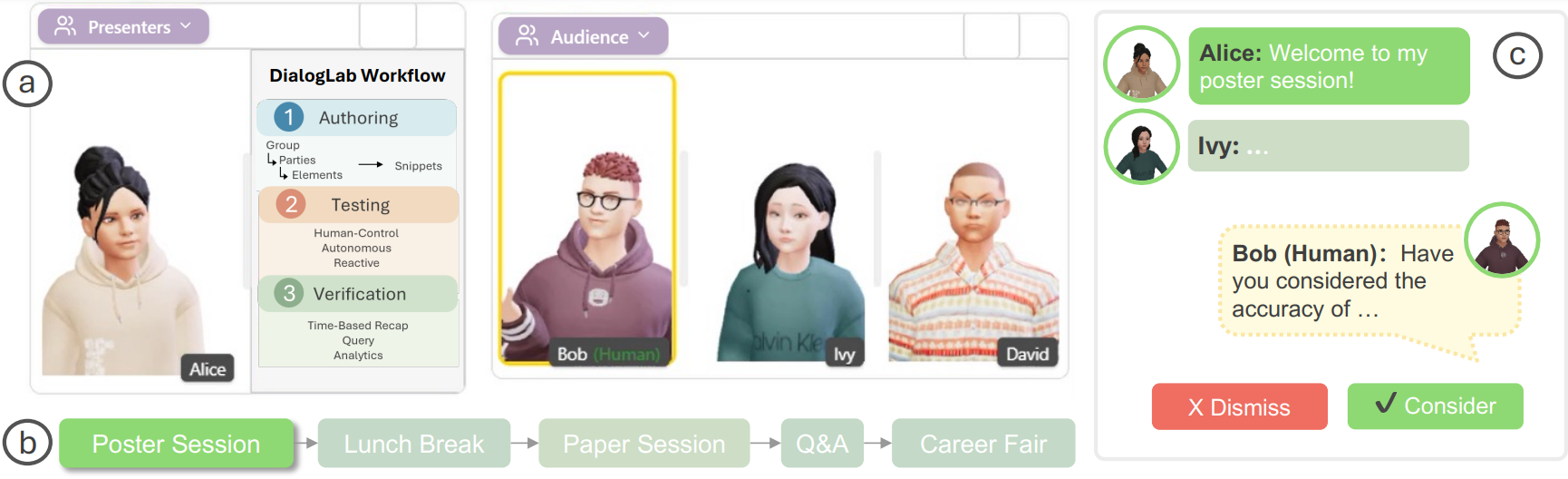
- Parties: sub-groups with distinct roles (e.g., presenters vs audience)
- Elements: individual participants (human or AI) and shared content artifacts (like slides)
This matters because many group experiences depend on roles and relationships. A “moderator” agent should behave differently than an “audience member” agent. And if you’re building educational simulations, a “teacher” agent needs different goals than a “student” agent.
2) Flow dynamics (how the dialogue unfolds over time)
DialogLab models time as snippets—distinct phases of a conversation. Each snippet can define:
- who participates in that phase
- a sequence/structure of turns
- interaction style (collaborative, argumentative, etc.)
- rules for interruptions and backchanneling
That “snippet” concept is powerful because real group conversations naturally have phases: introductions → context-setting → brainstorming → debating tradeoffs → closing decisions. In 1:1 chat, you can ignore that. In group settings, phase structure often determines whether the experience feels coherent or chaotic.
The author → test → verify workflow
DialogLab’s workflow is explicitly designed for iteration, not perfection on the first try:
Author: visual tools for scenes, roles, and prompts
The interface includes a drag-and-drop canvas where you arrange avatars and shared artifacts, plus inspector panels where you configure personas and interaction patterns. DialogLab also generates initial conversation prompts that you can refine—which is a pragmatic approach to getting started quickly without writing everything from scratch.
Test: simulation with human-in-the-loop control
For multi-party systems, testing is where things break. DialogLab includes a live preview transcript and a human control mode where the system suggests possible agent responses and the designer can accept/edit/dismiss them. This makes the designer a “director,” keeping the simulation believable while still leveraging generation.
Verify: analytics to find problems fast
Instead of forcing you to read endless transcripts, DialogLab provides a verification dashboard that visualizes conversation dynamics—like turn-taking distribution and sentiment flow. That’s the kind of feedback loop you need for multi-agent UX: when the system fails, you want to diagnose why (e.g., one agent dominates; interruptions never happen; topic shifts are too frequent; sentiment becomes weirdly flat) and fix it quickly.
Simulation modes: human control vs autonomous vs reactive
The post describes three modes used in their evaluation:
- Human control: the system suggests actions like “shift topic” or “probe question,” and the designer guides the agents.
- Autonomous: agents proactively participate based on pre-defined order rules, generating topic shifts and emotional responses automatically.
- Reactive: a simulated human agent responds only when directly mentioned (closer to classic “bot responds when asked”).
In their study (14 participants), human control was rated the most engaging and realistic. That result matches a broader product truth: when you’re trying to design a social experience, “full autonomy” is often less useful than “autonomy with a steering wheel.”
Use cases (where this is genuinely useful)
The future directions in the post are broad (education, games, social science). Here are concrete use cases where a DialogLab-style tool is immediately relevant:
- Meeting copilots that participate, not just summarize. Think: an AI that can moderate, ask clarifying questions, and keep the group on track.
- Classroom simulations. A teacher practices handling a disruptive discussion; students practice presenting to a simulated audience.
- Interview and negotiation training. Rehearse difficult conversations with multiple stakeholders (HR + manager + candidate).
- Roleplay for customer support escalation. Simulate a customer, an agent, and a supervisor in a realistic escalation flow.
- Game writing and NPC group scenes. Author multi-character dialogue with controllable dynamics instead of linear scripts.
- Research experiments on group dynamics. Controlled environments where you can vary moderation strategies and measure effects.
The common thread: you need repeatable scenarios and debuggable behavior. Purely generative group chats can be fun, but they’re notoriously hard to test and ship responsibly.
How I’d use DialogLab in a real product pipeline
If you’re building a multi-agent or group AI feature, here’s a practical way to use DialogLab-style tooling:
1) Start with “snippets” that map to product states
Define your conversation phases as product states (e.g., onboarding → agenda setting → brainstorm → decision). Make it explicit which agents are active in each phase and what success looks like. This prevents the common failure mode of “everything happens everywhere all the time.”
2) Create a small library of reusable roles
Instead of inventing new personas constantly, build reusable roles: Moderator, Skeptic, Summarizer, Domain Expert, Novice, Timekeeper. You’ll iterate faster and you’ll get more consistent UX.
3) Use human-in-the-loop simulation to discover edge cases
Before letting agents run wild in production, use human control mode to explore edge cases: interruptions at awkward times, an overly dominant participant, a topic change mid-decision, an emotional conflict. Capture these as regression scenarios.
4) Turn your simulations into a test suite
The highest leverage move is converting “nice demos” into repeatable tests. If you can replay scenarios (even partially) and measure outcomes, you can iterate safely as you change models, prompts, or orchestration policies.
What to measure: beyond “did it sound good?”
Group AI UX fails in predictable ways. Good verification dashboards should help you measure:
- Participation balance: does one agent dominate? does the human get crowded out?
- Turn-taking realism: are interruptions/backchannels happening at believable rates?
- Goal progress: did the group move from problem → options → decision, or did it loop forever?
- Topic drift: do agents derail the discussion or change topics too aggressively?
- Sentiment dynamics: is the mood plausible (e.g., disagreement when tradeoffs emerge)?
- Safety + policy adherence: especially important if the group scenario involves sensitive topics.
Notice that most of these metrics are interaction metrics, not pure language metrics. That’s the key shift when you move from 1:1 chat to group conversation design.
Risks and design pitfalls
A few practical pitfalls to watch for if you build group AI systems:
- Unclear authority. If the AI agent moderates, who does it represent? The company? The meeting owner? The group as a whole?
- Over-steering. Too much orchestration can feel artificial and reduce trust (“the AI is forcing the conversation”).
- Under-steering. Too little structure leads to rambling, repetitive discussions where nobody makes progress.
- Social awkwardness. Group settings amplify tone problems (sarcasm, overconfidence, unwanted “therapy voice”).
- Evaluation gaps. If you only judge outputs for helpfulness, you’ll miss systemic failures like domination, drift, and incoherent turn-taking.
Future directions (and why they matter)
The post mentions richer multimodal behavior (non-verbal gestures, facial expressions), photorealistic avatars, and 3D environments. That may sound like “demo polish,” but it can be important for group interactions because non-verbal cues carry a lot of the coordination load in real conversations. If your simulation ignores non-verbal signals entirely, you’re testing an interaction that may not generalize well to real-world group settings.
Even if you don’t care about 3D avatars, the underlying idea—separating social structure from temporal flow, and building author/test/verify loops—will likely show up in more practical product tooling for agents and copilots.
FAQ
Is DialogLab a model?
No. DialogLab is a framework/tooling layer for authoring and orchestrating multi-party conversations. It can connect to different LLM providers.
Do I need multi-agent simulation if I already have a meeting summarizer?
If your AI only summarizes after the fact, maybe not. But if you want AI to participate (moderate, probe, keep alignment), you’ll quickly run into multi-party dynamics that are hard to test without a tool like this.
What’s the biggest practical lesson from DialogLab?
For group AI UX, you need a design-and-test loop with control + verification. Pure generation isn’t enough; you need orchestration and analytics to ship reliably.
Tools & platforms (official + GitHub links)
- Google Research post: Beyond one-on-one: Authoring, simulating, and testing dynamic human-AI group conversations
- DialogLab (open-source): GitHub repo
- Paper (ACM DL): DialogLab: Configuring and Orchestrating Multi-Agent Conversations
- UIST 2025 program: Session listing
- Demo video: Video demonstration
Related reads on aivineet
- LLM Agent Observability & Audit Logs
- LLM Agent Tracing & Distributed Context (OpenTelemetry)
- KV Caching in LLMs Explained
My take: the most important contribution here isn’t any single interface widget—it’s the recognition that group AI conversation is a design domain with its own authoring abstractions and test requirements. If we want reliable multi-agent products, we need tooling like this to become normal.
Hands-on: what DialogLab looks like as software (and how to try it)
Because DialogLab is open source, it’s also useful as a reference implementation for “conversation orchestration tooling.” The GitHub repo describes it as an authoring tool for configuring and running human–AI multi-party conversations, and the stack is fairly approachable: a React/Vite client plus an Express server, with provider integrations for LLM APIs.
If you’re evaluating it, your goal shouldn’t be “run it once.” Your goal should be: can my team express roles, phases, and test cases in a way that’s maintainable? A quick install is only the first filter.
Local setup (high level)
The repo’s quickstart is essentially: install dependencies for client + server, add API keys, start both processes. Here’s a condensed version:
# client
cd client
npm install
npm run dev

# server (separate terminal)
cd server
npm install
node server.js
To run actual conversations, you’ll typically configure at least one provider key (OpenAI or Gemini). DialogLab also supports optional TTS for avatar speech synthesis. Even if you don’t care about 3D avatars, that multimodal layer is interesting because group conversation UX often relies on timing cues (who is speaking, who is reacting) that plain text transcripts don’t capture.
If you’re building something similar internally, DialogLab is a great reminder that “agent UX” is more than prompts: you need UI affordances for authoring, debugging, and verification. The test/verify layer is what makes multi-agent behavior safe to iterate on.

Leave a Reply